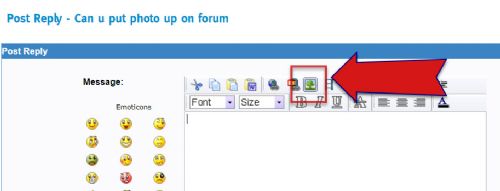
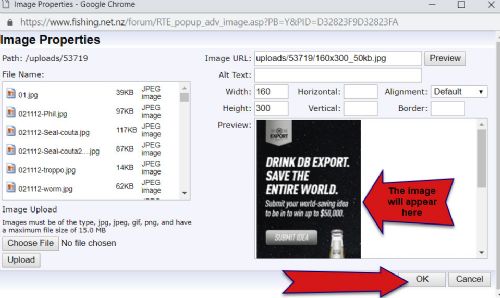
1. 1. Open a new post window or click a reply button and click on the image upload button.
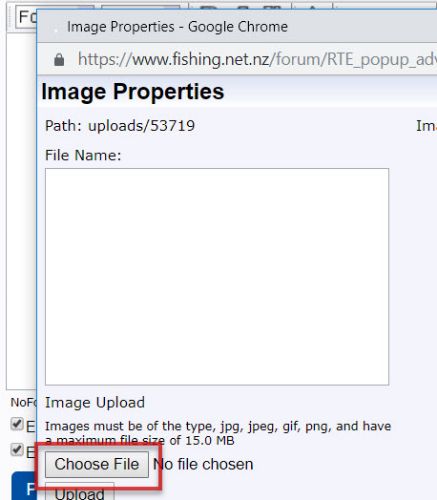
2. This dialogue box opens click 'choose file' to select the image from your computer or photo folder:
3. Once photo selected click upload
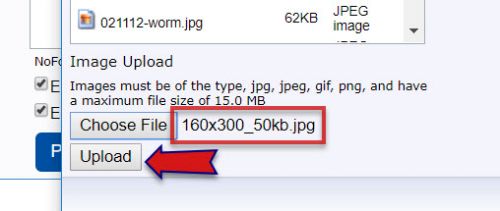
4. The image appears on the right - click upload to insert you’re your post.

 PE Pete wrote: PE Pete wrote:I still can't seem to post pics |


| lika wrote: Cleared cookies and still cannot upload,young fella here reckons its a setting somewhere on web itself as the microsoft message still pops up,tried boys laptop still nothing. |
 .. closed the window.. then hit the img icon
on the posting window again, choose the pic uploaded on the previous
window and all ok..
.. closed the window.. then hit the img icon
on the posting window again, choose the pic uploaded on the previous
window and all ok..
| Steps wrote: Did it to me the other day .. closed the window.. then hit the img icon
on the posting window again, choose the pic uploaded on the previous
window and all ok.. |
| MacSkipper wrote: Trying to post photo - can upload and preview picture I want but enter "ok" - nothing happens? |


Snapper, cod and marlin on the menu Despite the weather we have had recently, when... Read More >
Snapper out deep in cooler water As happens at this time of the year, the... Read More >
Small snapper the norm Over the last 10 years I have noticed with great concern the... Read More >
Fishing will be exceptional when water clears The massive amount of rainfall to hit the... Read More >


Major Bites
Minor Bites
Major Bites
Minor Bites

 Forum Topics
 New Posts
 Search
 FAQ
FAQ Register
 Login
Login


 Topic Options
 Post Options
 Likes(0)