Can u put photo up on forum
Printed From: The Fishing Website
Category: General Forums
Forum Name: Tech Topics
Forum Description: IT - Computers, software, phones, ISP's....
URL: https://www.fishing.net.nz/forum/forum_posts.asp?TID=129564
Printed Date: 02 Feb 2026 at 2:13am
Topic: Can u put photo up on forum
Posted By: Dave pope
Subject: Can u put photo up on forum
Date Posted: 25 Nov 2018 at 8:55pm
| Can u post up a photo as I am trying to find where to get a type of rod holder from |
Replies:
Posted By: Grunta
Date Posted: 26 Nov 2018 at 1:44pm
|
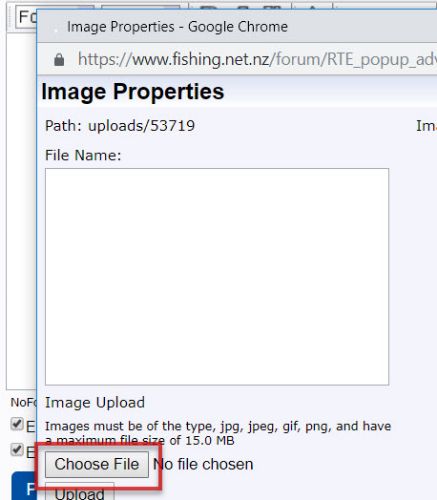
1. 1. Open a new post window or click a reply button and click on the image upload button.
2. This dialogue box opens click 'choose file' to select the image from your computer or photo folder:
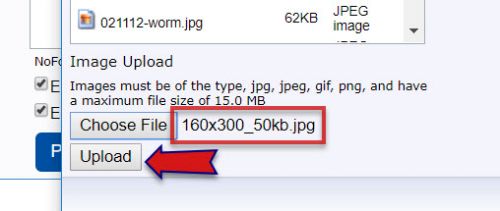
3. Once photo selected click upload
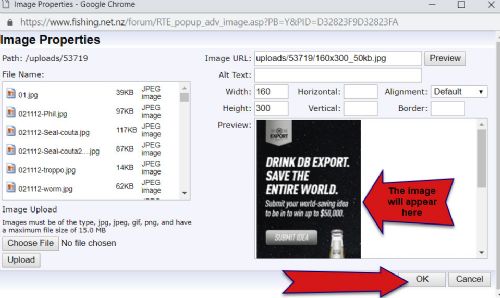
4. The image appears on the right - click upload to insert you’re your post.
|


Posted By: Dave pope
Date Posted: 27 Nov 2018 at 6:56am
|
Thanks heaps, it is hard at times for us older people. But got it now. Awesome. thanks
|
Posted By: PE Pete
Date Posted: 27 Nov 2018 at 7:53am
|
[IMG][/IMG] ------------- Tight lines PE Pete |
Posted By: PE Pete
Date Posted: 27 Nov 2018 at 7:56am
|
I still can't seem to post pics ------------- Tight lines PE Pete |
Posted By: Tagit
Date Posted: 27 Nov 2018 at 8:50am
| Pete - try deleting your cache and cookies from this site. |
Posted By: Grunta
Date Posted: 27 Nov 2018 at 11:06am
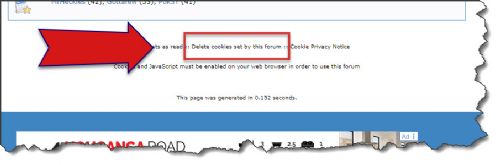 To clear your cache, if on windows hold down control/shift/delete keys simultaneously and select the clear cache option. If that doesn't work Pete, drop me a PM as there's a couple of other things we can try.
|
 PE Pete wrote:
Posted By: MB
Date Posted: 27 Nov 2018 at 11:25am
I think 3rd party hosting sites make it a lot easier. I'm using TinyPic at the moment. Upload and then copy/paste IMG Code in to forum. You don't even need an account. |
Posted By: pjc
Date Posted: 27 Nov 2018 at 2:03pm
|
Cleared cookies and still cannot upload,young fella here reckons its a setting somewhere on web itself as the microsoft message still pops up,tried boys laptop still nothing. ------------- Sex at 58.Lucky I live at 56 |
Posted By: pjc
Date Posted: 27 Nov 2018 at 2:07pm

------------- Sex at 58.Lucky I live at 56 |
Posted By: pjc
Date Posted: 27 Nov 2018 at 2:09pm
|
HaHa success,logged off,cleared cookies while logged off,logged on and it works,Will it work tomorrow as it worked last week then next day No. ------------- Sex at 58.Lucky I live at 56 |
Posted By: pjc
Date Posted: 27 Nov 2018 at 8:26pm
|
Not working now
------------- Sex at 58.Lucky I live at 56 |
Posted By: lika
Date Posted: 09 May 2019 at 10:20am
| Cleared cookies and still cannot upload,young fella here reckons its a setting somewhere on web itself as the microsoft message still pops up,tried boys laptop still nothing. |
Posted By: Grunta
Date Posted: 09 May 2019 at 12:01pm
|
Posted By: Grunta
Date Posted: 09 May 2019 at 12:02pm
|
Posted By: MacSkipper
Date Posted: 03 Aug 2019 at 10:00am
|
Trying to post photo - can upload and preview picture I want but enter "ok" - nothing happens? ------------- Good fishing trip nothing breaks, great trip catch fish. |
Posted By: Steps
Date Posted: 03 Aug 2019 at 2:40pm
Did it to me the other day  .. closed the window.. then hit the img icon
on the posting window again, choose the pic uploaded on the previous
window and all ok.. .. closed the window.. then hit the img icon
on the posting window again, choose the pic uploaded on the previous
window and all ok..
|
Posted By: MacSkipper
Date Posted: 03 Aug 2019 at 5:26pm
Thanks for your comment - tried it 2 days in a row...same ------------- Good fishing trip nothing breaks, great trip catch fish. |
Posted By: The Tamure Kid
Date Posted: 03 Aug 2019 at 11:29pm
It may be something strange with the image. I had one rogue image that wouldn't upload, despite doing exactly the same thing as ones that successfully uploaded. I tried multiple times, but it was just that one image that was a problem. In the end I copied the image onto a Word doc, saved it as a picture and uploaded that. Frustrating.
|
Posted By: MB
Date Posted: 03 Aug 2019 at 11:51pm
|
See my earlier post and stop buggering about with trying to upload photos to the forum.  |
Posted By: MacSkipper
Date Posted: 06 Aug 2019 at 9:17am
|
Was able to post photos finally - I tried setting as trusted site in internet explorer - still no joy. Tried in chrome - working fine able to load photos and post.    ! !------------- Good fishing trip nothing breaks, great trip catch fish. |
Posted By: Grunta
Date Posted: 06 Aug 2019 at 9:40am
| Hey John - what version of IE are you using? Will get the guys to have a look at it. Can you flick me a PM please mate? |
Posted By: MacSkipper
Date Posted: 09 Aug 2019 at 2:45pm
PM sent ------------- Good fishing trip nothing breaks, great trip catch fish. |