Outlook help needed

Page  12>
Post Options Post Options   Likes (0) Likes(0)   Quote smudge Quote  Post ReplyReply Direct Link To This Post Topic: Outlook help needed
    Posted: 27 Jul 2011 at 10:25pm
smudge View Drop Down
Moderator - Ninja
Moderator - Ninja
Avatar

Joined: 17 Jul 2002
Location: Te Toro
Status: Offline
Points: 33856
I have a pc running Win7 and I have Outlook 2010. I connect to the internet using a vodem because it is the only option out here in the sticks (from just around the corner I can see the Sky Tower), I'm sure they don't have as many telecoms infrastructure problems in Pakistan or NigeriaAngry.
 
Outlook want open unless it's online  - it doesn't have a work offline option that I can see like my old snotter had. This causes me a bit of grief.
 
It also doesn't download emails off the server - if I go on the old pc the emails are still on the server. Any ideas on what settings need to be changed or is this the way Outlook works? Doesn't seem right to me.
Back to Top
Post Options Post Options   Likes (0) Likes(0)   Quote Blue Asparagus Quote  Post ReplyReply Direct Link To This Post Posted: 27 Jul 2011 at 10:34pm
Blue Asparagus View Drop Down
Titanium
Titanium
Avatar

Joined: 10 Oct 2004
Location: Kerikeri N.Z
Status: Offline
Points: 27586
pm catchalot Mike he is pretty clued up on all that, but dont tell him I said thatLOL
Back to Top
Post Options Post Options   Likes (0) Likes(0)   Quote Bushpig Quote  Post ReplyReply Direct Link To This Post Posted: 28 Jul 2011 at 12:15am
Bushpig View Drop Down
Titanium
Titanium
Avatar

Joined: 17 Jul 2002
Location: Uzbekistan
Status: Offline
Points: 12656
You have me confussed Smudge, how do you mean it's not down loading from the server?

I assume you are using an ISP, when you connect to it the emails will appear on your outlook. A copy will still be on the ISP server until you delete then either by using outlook or connecting to the ISP via a web page. Opening outlook does not remove them from the ISP server
Back to Top
Post Options Post Options   Likes (0) Likes(0)   Quote Pickles Quote  Post ReplyReply Direct Link To This Post Posted: 28 Jul 2011 at 1:06am
Pickles View Drop Down
Silver
Silver
Avatar

Joined: 05 Jan 2010
Location: All over
Status: Offline
Points: 263
Hi Smudge
To address the emails being pulled off the server do the following.
In outlook:
1- Click Tools and click "Account Settings"
2- Double Click the account in question, its in the list (most likely only one there)
3- Click on the "More Settings" button
4- Click on the "Advanced Tab"
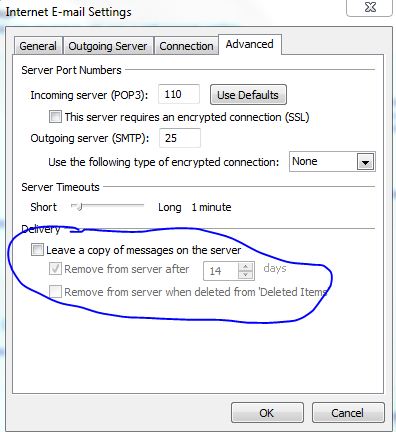
5- Ensure that "Leave a copy of messages on the server" is UNTICKED
 
Please keep in mind that when doing this, that the outlook on this pc will grab all the mail and the other pc you speak of will not download it as there wont be anything to download. If you are using both, set the main PC to NOT leave a copy and the "slave pc" to leave a copy.
 
Think of it as walking to the mailbox at the end of the driveway and taking the mail out. The wife goes to check it and there is nothing there, therefore no mail. If you keep a copy on the server, its like walking out to the mailbox, copying the mail and putting the original back in the letterbox. Hope you catch my drift?
 
Without trying to confuse you too much, if you use POP mail settings, nothing will sync on the server. If you use IMAP settings, everything syncs.
Regarding it not opening when you are offline. Can you advise the error you get or post a screenshot? By default all POP and IMAP accounts should open in outlook regardless of your internet connection status.
 
Hope this helps, trying to make it simple as possible
Back to Top
Post Options Post Options   Likes (0) Likes(0)   Quote Pickles Quote  Post ReplyReply Direct Link To This Post Posted: 28 Jul 2011 at 1:14am
Pickles View Drop Down
Silver
Silver
Avatar

Joined: 05 Jan 2010
Location: All over
Status: Offline
Points: 263
Originally posted by Bushpig Bushpig wrote:

You have me confussed Smudge, how do you mean it's not down loading from the server?

I assume you are using an ISP, when you connect to it the emails will appear on your outlook. A copy will still be on the ISP server until you delete then either by using outlook or connecting to the ISP via a web page. Opening outlook does not remove them from the ISP server
 
If you download to outlook and its set to NOT leave a copy on the server, it will delete the mail on the server once it hits your inbox.
 
Only if you use IMAP config in outlook, will the mail sync up to what is happening in your outlook. For example you delete one in outlook, it deletes on the server, you move it to another folder, it moves it on the server, you send a mail and it adds it to your sent items on the server. IMAP or Exchange only. Not POP.
 
Unfortunately, most ISP's and hosts are lazy and only help people out with POP settings. And using POP sux.
 
Back to Top
Post Options Post Options   Likes (0) Likes(0)   Quote smudge Quote  Post ReplyReply Direct Link To This Post Posted: 28 Jul 2011 at 9:37pm
smudge View Drop Down
Moderator - Ninja
Moderator - Ninja
Avatar

Joined: 17 Jul 2002
Location: Te Toro
Status: Offline
Points: 33856
Thanks Pickles you have described it well, I was trying to say that Big smile. I've looked through it a zillion times and haven't noticed a setting like that so I will dive in and have another look. I don't understand why there doesn't appear to be an option to work offline and why I can't open Outlook when offline. It is as though the icon is only a link to an internet address. My old pc I can find the setting to leave a copy on the server but not this one.
 
Bushie, thanks for your help but have a read through Pickles' explanation he describes it better than me.
 
 
Back to Top
Post Options Post Options   Likes (0) Likes(0)   Quote smudge Quote  Post ReplyReply Direct Link To This Post Posted: 28 Jul 2011 at 10:00pm
smudge View Drop Down
Moderator - Ninja
Moderator - Ninja
Avatar

Joined: 17 Jul 2002
Location: Te Toro
Status: Offline
Points: 33856
OK I found how to work offline but cant find TOOLS ... spooky.
Back to Top
Post Options Post Options   Likes (0) Likes(0)   Quote Pickles Quote  Post ReplyReply Direct Link To This Post Posted: 28 Jul 2011 at 10:01pm
Pickles View Drop Down
Silver
Silver
Avatar

Joined: 05 Jan 2010
Location: All over
Status: Offline
Points: 263
No problem. You should be able to open outlook from Start/All Programs/Microsoft Office/Microsoft Outlook 2010.
If it opens from there when you are offline then simply right click on the Microsoft Outlook 2010 icon in that folder/directory and Send To -> Desktop (create shortcut) This shortcut should open outlook regardless of the internet connection. If you get stuck or want to reconfigure it from scratch, just let me know Wink
Back to Top
Post Options Post Options   Likes (0) Likes(0)   Quote Pickles Quote  Post ReplyReply Direct Link To This Post Posted: 28 Jul 2011 at 10:03pm
Pickles View Drop Down
Silver
Silver
Avatar

Joined: 05 Jan 2010
Location: All over
Status: Offline
Points: 263
Aaaah sorry smudge thats my bad. Its 2010 I forgot!
OK click on
1 - File Tab (up the top left)
2 -Click Account Settings button and then account settings
3- Double Click the account in question, its in the list (most likely only one there)
4- Click on the "More Settings" button
5- Click on the "Advanced Tab"
6- Ensure that "Leave a copy of messages on the server" is UNTICKED
 
Back to Top
Post Options Post Options   Likes (0) Likes(0)   Quote smudge Quote  Post ReplyReply Direct Link To This Post Posted: 28 Jul 2011 at 10:18pm
smudge View Drop Down
Moderator - Ninja
Moderator - Ninja
Avatar

Joined: 17 Jul 2002
Location: Te Toro
Status: Offline
Points: 33856
I'm going to bash it with a bat! under Advanced I cant find an option to leave a copy ..
Confused
 
Back to Top
Post Options Post Options   Likes (0) Likes(0)   Quote Pickles Quote  Post ReplyReply Direct Link To This Post Posted: 28 Jul 2011 at 10:22pm
Pickles View Drop Down
Silver
Silver
Avatar

Joined: 05 Jan 2010
Location: All over
Status: Offline
Points: 263
can you not see this ?
 
Back to Top
Post Options Post Options   Likes (0) Likes(0)   Quote Bushpig Quote  Post ReplyReply Direct Link To This Post Posted: 28 Jul 2011 at 10:29pm
Bushpig View Drop Down
Titanium
Titanium
Avatar

Joined: 17 Jul 2002
Location: Uzbekistan
Status: Offline
Points: 12656
Smudge

Trying doing it sober
Back to Top
Post Options Post Options   Likes (0) Likes(0)   Quote smudge Quote  Post ReplyReply Direct Link To This Post Posted: 28 Jul 2011 at 10:32pm
smudge View Drop Down
Moderator - Ninja
Moderator - Ninja
Avatar

Joined: 17 Jul 2002
Location: Te Toro
Status: Offline
Points: 33856
Sober as Bushie, maybe that is the problem ...
 
Nope I dont get all those option Pickles.
Back to Top
Post Options Post Options   Likes (0) Likes(0)   Quote Pickles Quote  Post ReplyReply Direct Link To This Post Posted: 28 Jul 2011 at 10:35pm
Pickles View Drop Down
Silver
Silver
Avatar

Joined: 05 Jan 2010
Location: All over
Status: Offline
Points: 263
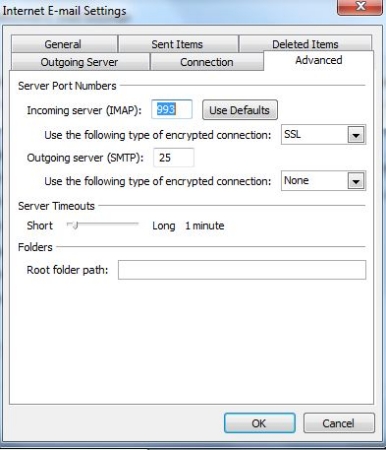
can you take a screenshot for me or does it look like this?
 
 
Back to Top
Post Options Post Options   Likes (0) Likes(0)   Quote smudge Quote  Post ReplyReply Direct Link To This Post Posted: 28 Jul 2011 at 10:35pm
smudge View Drop Down
Moderator - Ninja
Moderator - Ninja
Avatar

Joined: 17 Jul 2002
Location: Te Toro
Status: Offline
Points: 33856
I cant get print screen to work... I too dumb for this hehe
Back to Top
Post Options Post Options   Likes (0) Likes(0)   Quote Pickles Quote  Post ReplyReply Direct Link To This Post Posted: 28 Jul 2011 at 10:39pm
Pickles View Drop Down
Silver
Silver
Avatar

Joined: 05 Jan 2010
Location: All over
Status: Offline
Points: 263
use the snipping tool mate. Click start and start to type snipping, you will see it pop up in the list, hit it and grab a snip
Back to Top
Post Options Post Options   Likes (0) Likes(0)   Quote smudge Quote  Post ReplyReply Direct Link To This Post Posted: 28 Jul 2011 at 10:39pm
smudge View Drop Down
Moderator - Ninja
Moderator - Ninja
Avatar

Joined: 17 Jul 2002
Location: Te Toro
Status: Offline
Points: 33856
Sorry got disconnected ... that last shot is exactly what I see
Back to Top
Post Options Post Options   Likes (0) Likes(0)   Quote Pickles Quote  Post ReplyReply Direct Link To This Post Posted: 28 Jul 2011 at 10:46pm
Pickles View Drop Down
Silver
Silver
Avatar

Joined: 05 Jan 2010
Location: All over
Status: Offline
Points: 263
ah hah! You are using IMAP!
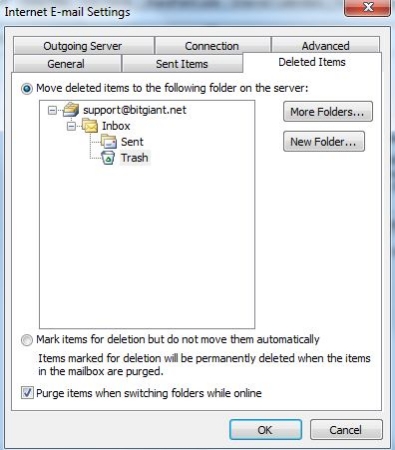
Ok, when you delete from your outlook it should move the mail into the trash folder/bin on the mail server. If it is not then try this. Instead of clicking the advanced tab, click the Deleted Items tab :


Ensure that the settings are similar to one of my accounts as above - you basically want to drill down until you find the Trash/Bin - Highlight the trash folder and hit OK.
Back to Top
Post Options Post Options   Likes (0) Likes(0)   Quote smudge Quote  Post ReplyReply Direct Link To This Post Posted: 28 Jul 2011 at 10:53pm
smudge View Drop Down
Moderator - Ninja
Moderator - Ninja
Avatar

Joined: 17 Jul 2002
Location: Te Toro
Status: Offline
Points: 33856
OK I have done that.
Thanks a million for your help!!Thumbs Up
Back to Top
Post Options Post Options   Likes (0) Likes(0)   Quote Pickles Quote  Post ReplyReply Direct Link To This Post Posted: 28 Jul 2011 at 10:55pm
Pickles View Drop Down
Silver
Silver
Avatar

Joined: 05 Jan 2010
Location: All over
Status: Offline
Points: 263
Anytime mate, was it already selected or did you have to change it?
Good test would be to delete one and then on your other machine (provided that also is configured to use IMAP), or even on the webmail, check that its moved to the deleted box. Hope it helped solve your problem.
Back to Top
Page  12>
Forum Jump
Forum Permissions View Drop Down


This page was generated in 0.145 seconds.

Fishing Reports Visit Reports

Saltwater Fishing Reports
Raglan Fishing Report - 12/11/26

Big spring snapper. With the more settled weather over the last couple of weeks there’s... Read More >

12 Nov 2026
Saltwater Fishing Reports
Mercury Bay Fishing Report - 12/11/26

Snapper hit and miss. Most reports have been telling us it’s becoming more difficult to... Read More >

12 Nov 2026
Saltwater Fishing Reports
Northland Fishing Report - 12/11/26

The switch has been flicked on! Call it what you want, El Niño, global warming,... Read More >

12 Nov 2026
Saltwater Fishing Reports
Tauranga Fishing Report - 12/11/26

Snapper and kahawai in close. Again, we start on a positive note, with some nice... Read More >

12 Nov 2026
Fishing bite times Fishing bite times

Major Bites

Minor Bites

Major Bites

Minor Bites