Auckland Coastal Survey Pictures
Printed From: The Fishing Website
Category: Saltwater Fishing
Forum Name: Landbased & Surfcasting
Forum Description: From rocks or beaches, here's the place for the landbased fishos to share information
URL: https://www.fishing.net.nz/forum/forum_posts.asp?TID=91704
Printed Date: 29 Jan 2026 at 8:14am
Topic: Auckland Coastal Survey Pictures
Posted By: Clifftastic
Subject: Auckland Coastal Survey Pictures
Date Posted: 13 Jun 2013 at 12:26pm
|
Just wondering if the Auckland based rock fisho's are aware of the coastal survey photos that are available on the Council's GIS viewer? Its a pretty cool resource for checking out the lie of the land viewed from the sea back toward the coast.
They cover a huge amount of the Auckland and Gulf Islands (some) coastline and the pictures are clear, have a zoom option and a recent.
To view, go to Council website http://www.aucklandcouncil.govt.nz" rel="nofollow - www.aucklandcouncil.govt.nz and open up the GIS viewer. Then -
1. Open up the Map content folder on the right of the screen 2. Click on the green + sign at the top  3. Then click on the empty box beside LiveMaps/Monitoring and click Add layer to map  4. Now open Monitoring layer and tick the Coastal Survey Photos box
 5. You should see thousands of small camera icons appear over the coastline
 6. Zoom in to wherever takes your fancy - i'm at the sw corner of Waiheke here, then open up the Identify (i) box
 7. Click on the big blue i button, then click on which camera view you would like to see
 Now click on the View photo button in the grey box and it will bring up the view.
Hope its easy enough to follow! ------------- http://www.legasea.co.nz" rel="nofollow"> 
|
Replies:
Posted By: EditB
Date Posted: 13 Jun 2013 at 12:28pm
That's awesome! Cheers bro  ------------- I do not lie about fishing, I willingly participate in a campaign of misinformation. |
Posted By: Finatic
Date Posted: 13 Jun 2013 at 12:46pm
|
Awesome! Thanks heaps for this< id="adlesse_unifier_magic_element_id" style="display:none;"> ------------- What's the cheapest type of meat? Dear balls. They're under a buck. |
Posted By: fisher
Date Posted: 13 Jun 2013 at 1:41pm
|
Brilliant! Thanks very much, very useful mate. -------------  North Shore Surfcasting Club North Shore Surfcasting Club
|
Posted By: Clifftastic
Date Posted: 13 Jun 2013 at 2:35pm
|
No worries fellas ------------- http://www.legasea.co.nz" rel="nofollow">
|
Posted By: SufixRockMan
Date Posted: 13 Jun 2013 at 4:15pm
| what a awesome resource, thanks clifftastic! |
Posted By: mouthu
Date Posted: 13 Jun 2013 at 5:56pm
|
Bloody hell, I use the council GIS every day almost and never would've known that was there. Good job. ------------- Yes it was me, I screwed it up for everyone. |
Posted By: Jwest
Date Posted: 13 Jun 2013 at 7:19pm
| Thats wicked, nice one Clifftastic! |
Posted By: C A
Date Posted: 13 Jun 2013 at 7:51pm
| mean cheers dude |
Posted By: MrWildabeast
Date Posted: 14 Jun 2013 at 10:11am
|
wicked!! ------------- Here fishy..fishy.... |
Posted By: khaled eid
Date Posted: 09 Mar 2019 at 6:46pm
|
Hi They change the web site can you provide the link to the new interface
|
Posted By: Munsterdog
Date Posted: 20 Oct 2023 at 9:15am
|
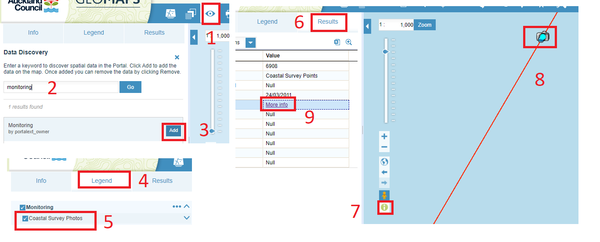
Hi all, I found this old post and note this information is still available at the new maps interface: http://geomapspublic.aucklandcouncil.govt.nz/viewer/index.html" rel="nofollow - https://geomapspublic.aucklandcouncil.govt.nz/viewer/index.html Hopefully the screenshots below helps with the steps in number order, essentially: 1,2,3 - > search for and add 'monitoring' 4,5 - > add coastal survey photos under the legend tab. 6,7,8 -> click 'info' button, double click a photo icon (zoom in to display them) 9 -> link to photo.
 |
Posted By: TheFisherMartian
Date Posted: 23 Oct 2024 at 9:20am
|
Thanks Munsterdog! Super helpful. In case anyone else is having trouble seeing any results when double clicking the photo icon, here's what worked for me. After adding coastal survey photos under the legend tab, use the "select" tool (cursor icon on the toolbar). In the "select" pop up, within the "spatial query" tab, tick "Select by feature using features from source". Then select "Coastal Survey Locations" in the dropdown menu. Finish by clicking "Apply". This will now let you click on photo icons and you can go to step 9 as per Munsterdogs post. |