Lowrance HDS just released Gen2 software UPDATE
Printed From: The Fishing Website
Category: General Forums
Forum Name: The Boat Shed
Forum Description: Discuss all things boating.
URL: https://www.fishing.net.nz/forum/forum_posts.asp?TID=90944
Printed Date: 16 Jun 2026 at 1:43am
Topic: Lowrance HDS just released Gen2 software UPDATE
Posted By: flyfisher
Subject: Lowrance HDS just released Gen2 software UPDATE
Date Posted: 15 May 2013 at 8:23pm
|
For Gen2 units, it's pretty sick and addresses a whole raft of things I did not like about the existing software! Seems very good; Dual charting Auto contrast in down / sidescan 5ghz GPS updates - smoother track plots! Screen shots now with PWR / PGE button not the silly enable box on startup! Can now display pdfs! New shading / contour edging Faster pan / zoom HDS Touch menu system... Plus a whole lot of other features. http://www.lowrance.com/en-au/Software-Updates/HDS-Gen2/" rel="nofollow - http://www.lowrance.com/en-au/Software-Updates/HDS-Gen2/ Release notes here: http://www.lowrance.com/Global/Lowrance/Documents/Software/HDS%20Gen2%20%202.0-45.135%20Release%20Notes.pdf" rel="nofollow - http://www.lowrance.com/Global/Lowrance/Documents/Software/HDS%20Gen2%20%202.0-45.135%20Release%20Notes.pdf ------------- https://www.youtube.com/user/troutboynz |
Replies:
Posted By: muchalls
Date Posted: 16 May 2013 at 1:43am
| Sweet,thanks |
Posted By: muchalls
Date Posted: 16 May 2013 at 4:38pm
| Now installed, looking good. Cheers for the link |
Posted By: flyfisher
Date Posted: 16 May 2013 at 4:47pm
|
No probs, yeah, some solid improvements there - just like getting a new unit! The 5ghz GPS updates is brilliant. ------------- https://www.youtube.com/user/troutboynz |
Posted By: krow
Date Posted: 16 May 2013 at 7:35pm
 Thanks. I like the chart share thing too. Thanks. I like the chart share thing too. |
Posted By: krow
Date Posted: 16 May 2013 at 9:26pm
Both units updated. |
Posted By: flyfisher
Date Posted: 17 Jun 2013 at 7:49pm
|
I have noticed some real big improvements with this latest software over trying it the last few weekends, namely the definition in sidescan and downscan is WAY improved, as is depth penetration, we we're getting a good solid sidescan reading at 70m which is brilliant! Albeit, only scanning to 125m either side, but good enough to see schools of fish and large stand-alone rocks. This was on 455khz and the new auto-contrast was doing it's thing very well too. Also a good clean noise free read at 20 knots on the plane, they have obviously made some adjustments on the auto noise filtering side that picks up when a boat is on the move. Top work Lowrance! Anyone else had a good play? Keep forgetting the key combination for grabbing screen shots - that's the only negative. Downscan was also good to about 70-80m, much improved over the 'useable' 50m or so in previous release. ------------- https://www.youtube.com/user/troutboynz |
Posted By: AP
Date Posted: 17 Jun 2013 at 7:56pm
| Looks good flyfisher...any recommendations where to purchase a sd/mmc card to download the upgrade to? cheers |
Posted By: flyfisher
Date Posted: 17 Jun 2013 at 8:01pm
|
Common as AP, you just need to go to any retailer like Jaycar, Harvey Norman, JB HiFi, Noel Leeming etc and buy a small 2gb micro SD card, but make sure it includes the full size SD card caddy so you can insert it in your computer as well. Should be well under $10. If you get stuck, sing out and I'll mail the update to you on a spare I have. ------------- https://www.youtube.com/user/troutboynz |
Posted By: eikon
Date Posted: 17 Jun 2013 at 8:04pm
Just ya local Dick Smiths bud. The file is only 60MB or something so a wee 2GB card is plenty. Or steal one from your digital camera. Love the update, they did way more than they have announced. I could see my puka rig at 150meters i.e. sinker, and the two baits/traces as three individual returns and could even see scarpies darting up to bite at the shiny sinker (it's still new) when I wound up a few meters.
|
 AP wrote:
Posted By: AP
Date Posted: 17 Jun 2013 at 8:09pm
| Cheers mate, will pop into Harvey Norman tomorrow for a look. I've got a macbook, just looking now it doesn't look like its got an SD card slot??? If I get stuck I may take you up on the offer of your spare....happy to cover cost, plus can probably pick up as also based in Wellington. Cheers |
Posted By: flyfisher
Date Posted: 17 Jun 2013 at 8:13pm
|
No problem, I work on Tory Street so flick me a pm if you get stuck and can bring into the office. Andrew ------------- https://www.youtube.com/user/troutboynz |
Posted By: AP
Date Posted: 17 Jun 2013 at 8:16pm
| Beauty! will be in touch if I can't suss it out. Cheers for the help |
Posted By: ShaunQ
Date Posted: 17 Jun 2013 at 8:34pm
|
Looks like a new update maybe coming soon from Lowrance as a lot of users including me have noticed significant lag in system performance since the 2.0 update. Mostly when going to the Pages screen and once there slow movement between options, similar to HDS Gen 1's, really hope they fix this soon as I miss the speed! Lots of nice new features and improvements though especially on the chart side and with the recent install of a Point 1 antenna its a great system to have. ------------- http://www.shaunquinlan.com" rel="nofollow - www.shaunquinlan.com |
Posted By: flyfisher
Date Posted: 17 Jun 2013 at 8:36pm
|
Yeah good point, I did notice a real lag when hitting 'page' quite noticeable!! Drifting at 5m zoom was great with new ghz! ------------- https://www.youtube.com/user/troutboynz |
Posted By: krow
Date Posted: 17 Jun 2013 at 8:39pm
|
Wow I'm looking forward to trying the new software out. Weather and work = not had a crack yet. |
Posted By: flyfisher
Date Posted: 02 Jul 2013 at 8:15pm
Here's a comparison pic of the new software VS the old, below is the old software;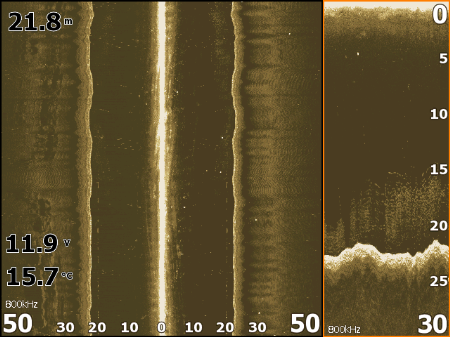 Exact same spot using the new software, notice the difference in contrast and clarity, sand and reef pops out (easier to see at full size) and this is with an additional10m out to each side. 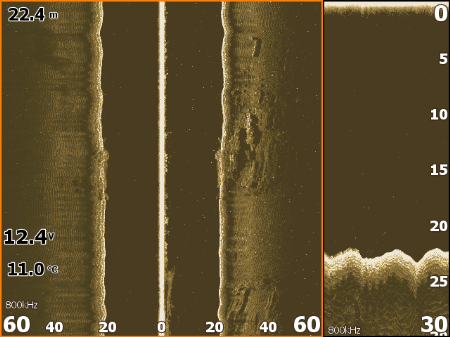 ------------- https://www.youtube.com/user/troutboynz |
Posted By: ShaunQ
Date Posted: 26 Jul 2013 at 7:32pm
|
New 2.1 updates are available now for Gen2 Touch & Non Gen2 Standard MFD's, I've just installed and it seems to have fixed the lag I mentioned a few posts above, stoked to have the snappy performance back that I lost with the 2.0 update... http://www.lowrance.com/en-US/Software-Updates/HDS-Gen2/" rel="nofollow - http://www.lowrance.com/en-US/Software-Updates/HDS-Gen2/ There's a few other updates available too, including one for the Point 1, have a dig around on their site. ------------- http://www.shaunquinlan.com" rel="nofollow - www.shaunquinlan.com |
Posted By: Time_Bandit
Date Posted: 26 Jul 2013 at 7:44pm
|
cheers mate will download that looks good for the point 1 ------------- “Be yourself; everyone else is already taken.” |
Posted By: flyfisher
Date Posted: 26 Jul 2013 at 7:47pm
|
Good on ya Shaun, we'd never know about these updates otherwise! ------------- https://www.youtube.com/user/troutboynz |
Posted By: ShaunQ
Date Posted: 26 Jul 2013 at 8:16pm
|
Haha no worries I've been keeping an eye out for the update as I knew the issues would have to be fixed by Lowrance. With the popularity of the GoFee WiFi building too I think updates will be a more common thing to allow apps and hardware to interface better. I haven't tested this update on the water so can't confirm what effects the Point 1 update has had yet, I didn't see a need for any update so be interesting to see what the difference is there, I think the main feature added is the ability to change settings for the Point 1 which wasn't available before. ------------- http://www.shaunquinlan.com" rel="nofollow - www.shaunquinlan.com |
Posted By: krow
Date Posted: 26 Jul 2013 at 8:56pm
|
Thanks again Shaun I only got to do one trip out since the last update but must admit it was better, way less interference on the screen. So now I'll do this one too. Hopefully I'll get out more before the next update. |
Posted By: CEEBEE
Date Posted: 27 Jul 2013 at 11:45am
|
Nice thanks ------------- I STARTED THE DAY WITH NO FISH AND I STILL HAVE PLENTY LEFT |
Posted By: Contract
Date Posted: 29 Jul 2013 at 11:07am
| Andrew. What did you use to open the Lowrance update .UPD file ??. I am having real difficulties with my HDS8 (Gen 2) unit. It is taking an age to "lock on" to a satellite fix. Maybe the upgrade might fix this. At least I want to try it before I spend another $500 on a separate aerial. My Downscan unit is not working at all. I get the message "No Device" when I go to the Downscan page. Have had a look behind the dash at the LSS2 unit and can't see any obvious light on it, to indicate it is "powered up". The wiring looks pretty "idiot proof". I can only see a "Power in" to the unit. A "transducer in" to the unit. A connector from the LSS2 to the HDS8. That's it. I can't see how there can be a problem (unless the actual unit is Wallaby-Ted) |
Posted By: flyfisher
Date Posted: 29 Jul 2013 at 11:14am
|
Once you go to the lowrance update page, you download the update for the gen2 unit, make sure a blank SD card is inserted into your PC (make sure it is blank by doing a quick format in windows explorer). Once downloaded, double click the zip file, then click EXTRACT it to your blank SD card, don't copy and paste etc. once finished pull out and insert into your HDS8, turn it on and it will install the update automatically. Definatley sounds like your SS unit is not connected and not getting 12v at all, where does the yellow wire go to that comes from the SS unit? _ It is located within the power wires (you'll need to reace that cable to where the three wires split, I'm betting it's not connected. was it installed professionaly or DIY? ------------- https://www.youtube.com/user/troutboynz |
Posted By: Contract
Date Posted: 29 Jul 2013 at 11:32am
|
The units were installed professionally by Gulfland (but the LSS2 was bought locally from a parallel importer) I have rung the parallel importer to tell them of my problem. They said they would get their "techs" to ring me back. I am still waiting for their call. I downloaded the Lowrance file and it was a "ZIP" file. I then "unzipped" and the .UPD file was the result. I was going to have a look at the UPD file before I loaded onto the SD card. I guess you are saying "don't open it ~ just put the UPD file straight on the card ~ and the HDS8 will do the work" ??
|
Posted By: flyfisher
Date Posted: 29 Jul 2013 at 11:42am
|
They should have tested the install, still think it will be very simple to resolve and will rest with that yellow wire. You could check the inline fuse to the SS unit I guess, but doubt it's failed. The SS unit lights up like a disco ball when it's getting a TX / RX signal. Makes no difference re: paralell import of the SS unit - there are no differences in local vs international on them. From what I understand the separate SS unit itself is very reliable. You won't be able to view the UPD file, will be code, yip, extract that zip file strait to the card, not just the UPD file and insert it - job done. It's a self executing update. ------------- https://www.youtube.com/user/troutboynz |
Posted By: Contract
Date Posted: 29 Jul 2013 at 11:45am
| Cheers for that. It's a bit frustrating with the boat being kept an hour away from home ! Won't get another chance to check it until next weekend. I got behind the dash & there was definitely no lights visible on the SS unit. Mind you ~ I could not see any LED's that looked as if they should be on, either ! |
Posted By: roughy
Date Posted: 29 Jul 2013 at 3:22pm
|
How do I tell if my unit is generation 1 or 2? Can anybody tell from the photo? http://s200.photobucket.com/user/chopperchops/media/2013-02-21162349_zpsc7bbcafc.jpg.html" rel="nofollow">  |
Posted By: Contract
Date Posted: 29 Jul 2013 at 3:33pm
I think the Gen II are a darker grey. Gen I was quite a light grey ? If anyone can tell you, it will be Flyfisher 
|
Posted By: roughy
Date Posted: 29 Jul 2013 at 3:41pm
|
OK thanks, would like to update it but if it's a gen 1 it will be a waste of time. Also like the idea of the GoFree wifi box to hook up tablets that can control the map and show a clone of the sounder. http://www.lowrance.com/en-au/Search/?query=gofree
|
Posted By: Contract
Date Posted: 29 Jul 2013 at 3:44pm
|
A little further "Googling" Gen 1 = Black Lowrance Logo Gen 2 = White Logo Also ~ when you "power up" there is a "big Gen II" logo on your screen. I remember this quite clearly, though I would not know what colour logo was stamped on the unit !
|
Posted By: roughy
Date Posted: 29 Jul 2013 at 4:04pm
|
Thanks! Looks like I have a Gen 1 dang it. May have to upgrade so I can get the use of the wifi and the upgrades.
|
Posted By: ShaunQ
Date Posted: 30 Jul 2013 at 3:27am
|
To me it seems Lowrance are ditching development for the Gen 1's now which is a shame, main reason I guess is the internal processor which lacks the processing power of the Gen2's although they can still both operate mostly the same function's. The recent release of the 2.0 update and the GoFree network have now pushed the gap even further and a lot of new features and hardware are either unusable or wont work altogether with a Gen1 in the mix. I just hope Lowrance don't drop the ball on the Gen2 non touch units as they are great and not everyone wants to pinch and swipe! I've never had problems with my Gen1 & Gen2 HDS 8's but will be swapping the Gen1 out shortly to bring the GoFree WiFi onboard for app development. Roughy if you're upgrading your units take a good look at all other devices on your network first, read the specs and make sure everything will work as you'd expect, there's even minor differences in compatibility and features between Gen2 Touch & Non Touch emerging already  ------------- http://www.shaunquinlan.com" rel="nofollow - www.shaunquinlan.com |
Posted By: roughy
Date Posted: 30 Jul 2013 at 8:48am
|
Thanks ShaunQ. I know that the minute I get a Gen2 they will bring out the 3's. I have a sonic hub hooked up to my sounder so I hope that will still work if I upgrade? |
Posted By: flyfisher
Date Posted: 30 Jul 2013 at 9:01am
|
The menu paging seems much better, for some reason my HDS7 would not accept the update, whereas the HDS5 it's networked to was fine? Bizzare... managed it in the end by trying another card. Startup seems to take much longer??? Or is it my imagination? ------------- https://www.youtube.com/user/troutboynz |
Posted By: muchalls
Date Posted: 30 Jul 2013 at 9:26am
|
Startup was taking ages after the first update.......several minutes! Hope it is sorted with this update |
Posted By: flyfisher
Date Posted: 30 Jul 2013 at 9:34am
|
Unfortunately it seems to take twice as long as the last update for me anyway!... ------------- https://www.youtube.com/user/troutboynz |
Posted By: Davo
Date Posted: 30 Jul 2013 at 9:45am
| my startup speed is faster with the upgrade but Im using the gen2 touch so perhaps the older non touch ones have different chips inside? I find the gps recording much better now too with it polling the satellite network a lot more frequently per second. Makes for far more accurate position marking of tall narrow fish schools :-) |
Posted By: ShaunQ
Date Posted: 30 Jul 2013 at 5:07pm
|
I don't see a Gen3 coming out anytime soon Roughy, just further development of the Gen2's but most of this will be for the Touch series and new hardware to integrate with the GoFree WiFi. The other feature that sets the Gen2 Touches apart from the Non Touch is video input/playback. I know that Lowrance is developing a camera to work with the Touch series. I went for a buzz around the bay yesterday in calm but rainy conditions, didn't notice any massive difference to the Point 1's performance but it sure is a lovely device to have onboard, can't recommend them enough. I also got to test the beginning stages of the hardware/app that I'm developing with a good friend in NZ and it was great to have this onboard  ------------- http://www.shaunquinlan.com" rel="nofollow - www.shaunquinlan.com |
Posted By: roughy
Date Posted: 31 Jul 2013 at 7:42am
| Thanks ShaunQ, I might start another thread so I'm not completely hijacking this one. |
Posted By: yknot
Date Posted: 07 Aug 2013 at 5:56pm
|
Just updated my unit, very user friendly. Question thou, do I have to try and remember all the previous setting preferences for screen colours etc, or do they stay the same? ------------- Those that say it can't be done are being overtaken by those doing it. |
Posted By: ShaunQ
Date Posted: 07 Aug 2013 at 6:00pm
|
Smaller updates like 2.1 shouldn't affect any of your settings, in a rare case minor settings may be lost but you should be fine. I do a backup of my settings, trails and waypoints every couple of months, settings are good to backup before any major update, go to your files screen and you'll find the option to export them. ------------- http://www.shaunquinlan.com" rel="nofollow - www.shaunquinlan.com |
Posted By: Snuffit.
Date Posted: 07 Aug 2013 at 6:20pm
|
Hi Shaun how do you reload yr backups? I managed to wipe all my wayoints (doh) but had backed them up beforehand. Sorry for thread hijack. ------------- You cant eat my toast fish |
Posted By: yknot
Date Posted: 07 Aug 2013 at 6:24pm
Better look at doing an update then, never thought of loosing the settings or spots etc, more learning to do on saving etc. ------------- Those that say it can't be done are being overtaken by those doing it. |
Posted By: ShaunQ
Date Posted: 07 Aug 2013 at 9:16pm
|
Backup files go onto an SD card, I always erase the card on computer and reformat it before using one, put the backup files into the main/first directory on the card. Card into HDS then under the files menu you'll see your card at the top of the menu screen, expand this and then hover down to the appropriate backup file whether it be settings or waypoints. Hitting enter will give you options to import, update etc. depending on the file... http://imageshack.us/photo/my-images/542/sf6i.jpg/" rel="nofollow">  Second Image shows Settings Database and lower left softkey gives you the option to export these, next screen will show you the available places to save it to, if you've got an SD card in it will be at the top and hit enter on this then transfer to your computer. I Give them a date and HDS1 or HDS2 so I know which settings file comes from which unit :) I've never actually imported waypoints onto the unit so have never been further sorry with that one Snuffit, I'd imagine you would have the option to add as new waypoints to your existing database on the HDS, or replace existing ones altogether. ------------- http://www.shaunquinlan.com" rel="nofollow - www.shaunquinlan.com |
Posted By: yknot
Date Posted: 07 Aug 2013 at 9:26pm
|
Awsome, will give it a go in he weekend. ------------- Those that say it can't be done are being overtaken by those doing it. |
Posted By: Snuffit.
Date Posted: 08 Aug 2013 at 11:18am
|
Got the import sorted - extract file to SD card, put it in slot, fire up the sounder go to files/import and bingo! What a relief it took me ages to manually load them originally. ------------- You cant eat my toast fish |
Posted By: krow
Date Posted: 08 Aug 2013 at 6:10pm
|
Go Lowrance getting better at the user friendly stuff, but some things are missing off the manual. eg try to see how to reset your distance. I like to see how far I go each trip. |
Posted By: Davo
Date Posted: 08 Aug 2013 at 6:15pm
|
I reckon the sounder software has got heaps better too...i was using my hds9 touch last weekend to good effect up to 450m and was spotting and catchin bass and bluenoss. Really clear and easy to see and with the increased poling of the gps i could mark them on the plotter a lot better too ill get some pics of the depth and fish sign next time to put up. I hope they keep improving cos its going from strength to strength imo
|
Posted By: Nirai
Date Posted: 16 Aug 2013 at 3:38pm
|
I have HD7 Touch and its not loading the new software. Yes I have unzipped file. My understanding is put SD card into slot power up and away you go. Only that aint happening? ------------- "Gunrunner" Surtees 610 Game Fisher current *"Double Barrel" Seacat 635 "Good Riddance!" *"Seriola" Surtees 485 CC Retired with honours! |
Posted By: ShaunQ
Date Posted: 16 Aug 2013 at 5:05pm
|
Always a good idea to format a card before putting it in a device to update its software, just make sure you format as FAT32. Any chance you're on a Mac? I am and when I double click on the file downloaded from Lowrance it expands into some other exe files without a .upd file, this happens using OSX's Archive Utility which by default is set to expand zip files. I use StuffitExpander instead for zip files and this gave me the .upd file and nothing else. This file and only this file should be directly copied to the SD card, no folders or the update file within a folder. ------------- http://www.shaunquinlan.com" rel="nofollow - www.shaunquinlan.com |
Posted By: Nirai
Date Posted: 16 Aug 2013 at 7:08pm
Yes I am on Mac sounds like you have fixed my issue thanks Shaun I will let you know how I get on ------------- "Gunrunner" Surtees 610 Game Fisher current *"Double Barrel" Seacat 635 "Good Riddance!" *"Seriola" Surtees 485 CC Retired with honours! |
Posted By: Time_Bandit
Date Posted: 16 Aug 2013 at 10:38pm
|
Have you got the touch update not the hds update ------------- “Be yourself; everyone else is already taken.” |
Posted By: Nirai
Date Posted: 17 Aug 2013 at 5:17pm
|
Shaun I downloaded StuffIt expander and it all worked A1 all done and dusted thanks for your help ------------- "Gunrunner" Surtees 610 Game Fisher current *"Double Barrel" Seacat 635 "Good Riddance!" *"Seriola" Surtees 485 CC Retired with honours! |
Posted By: ShaunQ
Date Posted: 17 Aug 2013 at 5:26pm
|
Nice one happy to help and enjoy the update! ------------- http://www.shaunquinlan.com" rel="nofollow - www.shaunquinlan.com |
Posted By: RH580ikanui
Date Posted: 26 Oct 2013 at 12:06pm
|
After every ones opinions on the HDS 7 Gen2 touch.. What trannies are you using.. what depth are they good do... do they out do the old LCX 113HDs etc. Want something that will go deep & pretty much a Lowrance follower. ------------- "IKANUI" RH580 SUZUKI DF140 |
Posted By: Davo
Date Posted: 26 Oct 2013 at 12:22pm
| Phil, Just flicked you a PM in reply. Im using the HDS9 Gen II touch with the TM260 and am very effectively targeting fish in the 200 - 600m depth range. Being able to mark individual fish targets and have them appear on the plotter automatically is VERY useful for planning drifts |
Posted By: RH580ikanui
Date Posted: 26 Oct 2013 at 1:00pm
|
Cheers Davo Nice fish.. Not sure my budget will stretch to the G2T plus 260 ------------- "IKANUI" RH580 SUZUKI DF140 |
Posted By: ShaunQ
Date Posted: 26 Oct 2013 at 1:36pm
|
Looks like Lowrance has a few new products to release soon, so may be worth sitting back on spending until then. Word on the wharf is that they have a new chirp transducer/system coming out based on the Airmar TM150, will work outta the box on the HDS Touch series, or with Gen2 non Touch with the addition of a "SonarHub" which is similar to the black box that the structure scan uses, but has the tech to sort out broadband sonar. Pricing on this new gear is supposed to be very decent, would be nice if you could update the current StructureScan HD box to work with broadband though :( Also on the wharf today, seagulls! ------------- http://www.shaunquinlan.com" rel="nofollow - www.shaunquinlan.com |
Posted By: ShaunQ
Date Posted: 28 Oct 2013 at 3:49pm
|
No info up on the Lowrance website yet, but here's some info on the new SonarHub available for pre order at BassPro... http://www.basspro.com/Lowrance-SonarHub-with-TM150-CHIRP-and-LSS2-Transducers/product/1309121300/" rel="nofollow - http://www.basspro.com/Lowrance-SonarHub-with-TM150-CHIRP-and-LSS2-Transducers/product/1309121300/ Nice to see they have brought chirp technology into the HDS2 system to compete with other brands who have had it available for a while now, good to have a "blackbox" to handle all sonar devices and means one less cable that has to be connected to the back of the HDS unit itself. They've also released a new "Uni-Dock" for the SonicHub to work with the latest iPhones... http://www.lowrance.com/en-US/News/Debut-Uni-Dock-For-Sonichub/" rel="nofollow - http://www.lowrance.com/en-US/News/Debut-Uni-Dock-For-Sonichub/ This has come a bit late to the game though I think as its been an issue for most SonicHub/iPhone 5 users for almost two years now and most users have changed their systems to work. They could've just released a new dock insert that had the lightning connector as an upgrade for the original dock. Also a lot of people are using their phones now for wifi apps that work with the HDS and NMEA data so want access to their phones for this and to take photos, further rendering the dock useless. I'm now using bluetooth, The Fusion MS-BT100 which is a great little product designed for the marine environment. Although its cool to be able to control music from the HDS the interface to do so is very slow and ancient and nothing like browsing your music on the iPhone. Lowrance would be better off working on the software side of things to make browsing and selecting music via the HDS a better experience and actually usable. My original SonicHub dock is long gone now replaced with a small glovebox to keep keys/phone etc. ------------- http://www.shaunquinlan.com" rel="nofollow - www.shaunquinlan.com |
Posted By: Time_Bandit
Date Posted: 28 Oct 2013 at 5:39pm
|
looks cool ------------- “Be yourself; everyone else is already taken.” |
Posted By: Time_Bandit
Date Posted: 28 Oct 2013 at 5:52pm
|
http://www.gpscity.com/search/q=tm150+chirp" rel="nofollow - http://www.gpscity.com/search/q=tm150+chirp ------------- “Be yourself; everyone else is already taken.” |
Posted By: Davo
Date Posted: 28 Oct 2013 at 6:07pm
|
Thanks Shaun and TB. Stoked to hear they are head into CHIRP but am I right in thinking they are aiming for the inshore fisho market with the TM150? The TM150 is 95 - 155khz. I'm hanging out for someone to bring out a Chirp module and tranny that'll allow lower minimum frequencies for deepwater bigfish work thats more affordable. Ideally I'd love to get something in the 28khz range but even to get closer to 50khz (ie 48 - 52khz band) would be good. I think Im hoping too much...but surely it must be coming? Must get me one of those unibrackets for the sonic hub. I've been using a cable for the last 2 years!
|
Posted By: RH580ikanui
Date Posted: 28 Oct 2013 at 6:12pm
|
Davo the TM265 is the wiz bang CHIRP trannie as far as I can tell.. I agree that the TM is not the best for the deep stuff. ------------- "IKANUI" RH580 SUZUKI DF140 |
Posted By: Davo
Date Posted: 28 Oct 2013 at 6:32pm
| Do you know if the TM265 will go with the new Chirp functionality upgrade on the lowrance HDS? I see it can ping to 42khz...but will the new sonar hub handle that low? If so, Im getting one ASAP!!! |
Posted By: RH580ikanui
Date Posted: 28 Oct 2013 at 6:46pm
|
I am don't know enough about the topic Davo check out this link... it is an amazing insight to the world of CHIRP. The only real problem I can see with CHIRP is the distortion in targets & information from the movement of the boat in choppy seas. Flat calm no problems. Form what the guy who wrote this is saying that even with the non CHIRP transducers there appears to be a CHIRP going on in the HDS GEN2.. how eles can Lowrance get the results wit such low outputs compared to the LCX series etc. I am not sold on CHIRP yet. A bit like V8s v the rice burners to me. http://www.thehulltruth.com/marine-electronics-forum/506221-chirp-sounders-fish-finder-explained.html" rel="nofollow - http://www.thehulltruth.com/marine-electronics-forum/506221-chirp-sounders-fish-finder-explained.html ------------- "IKANUI" RH580 SUZUKI DF140 |
Posted By: ShaunQ
Date Posted: 28 Oct 2013 at 7:51pm
|
The TM150 is more suited shallow to medium depth water which suits me fine but I really hope Lowrance hasn't limited this to just the one transducer and I don't think they would as there are so many options to suit so many different boating/fishing setups. I'd like to upgrade to a thru hull next and Airmar have plenty of these! ------------- http://www.shaunquinlan.com" rel="nofollow - www.shaunquinlan.com |
Posted By: Time_Bandit
Date Posted: 28 Oct 2013 at 8:08pm
|
what do you call medium depth 50m ? ------------- “Be yourself; everyone else is already taken.” |
Posted By: Fishing Addiction
Date Posted: 28 Oct 2013 at 8:23pm
|
If the lowrance are catching up to garmin I think it will be great for the consumer. These units should take the tm150m trans mount but I have seen some awesome results of the b75h and b75m transducers Recently got my chirp set up and hope to try it this weekend. The fish won't know where to hide |
Posted By: krow
Date Posted: 28 Oct 2013 at 9:45pm
|