aaargh.... problems
Printed From: The Fishing Website
Category: General Forums
Forum Name: Tech Topics
Forum Description: IT - Computers, software, phones, ISP's....
URL: https://www.fishing.net.nz/forum/forum_posts.asp?TID=84083
Printed Date: 22 Nov 2026 at 7:28am
Topic: aaargh.... problems
Posted By: like_to_strike
Subject: aaargh.... problems
Date Posted: 27 Oct 2012 at 10:59am
|
Ok so heres the problem. my old man got a computer a while ago, what a headache haha im over there every week fixing something or deleting the 10 toolbars hes running haha. I started it in safe mode and everything worked first pop so went back to normal mode and run msconfig and only let it start up with essential programs but still had the same problems. so now im thinking a virus has stuffed the OS . he had norton on it. so i deleted it and installed kaspersky. found 7 viruses lol. and installed malwarebytes. found more! Any suggestions. im stumped. it was a store bought pc so no OS disk. His is win 7 64bit home premium. can i download a copy of 64bit home premium and try run repair on it? and if worst comes to worst can i format hard drive and re install the OS from the download and use the product key on the pc to activate it? cheers guys im stumped.
|
Replies:
Posted By: Olfart
Date Posted: 27 Oct 2012 at 11:09am
|
I'm no expert, but when my laptop starts to run a bit slow I use a program called CCleaner to scan and fix issues in the registry; and clear out the internet cache files and things seems to go a lot better after that. You can download the program free off the web. ------------- Semper in excreta sumus, solum profundum variat.... |
Posted By: Jet_ski_fisher
Date Posted: 27 Oct 2012 at 11:11am
| It is a startup problem. install CC cleaner and click tools then startup, disable what you need not to start up then reboot, and it should be fine, you can click the registry icon and do a scan it helps with start up problems as well. |
Posted By: like_to_strike
Date Posted: 27 Oct 2012 at 11:47am
|
Yeah sorry forgot to say i use CCleaner as well. cheers built to fish ill give that a go.
|
Posted By: CEEBEE
Date Posted: 27 Oct 2012 at 5:06pm
|
What are the PC specs please will help....how much ram etc. If it runs fine in safe mode all is good as it will be too many programs running in the back ground slowing it up and hogging ram. Use the crtl-alt-del facility access "task manager / processes / click on mem usage twice to reveal the highest usage at the top and tell us which programs are consuming the most memory. ------------- I STARTED THE DAY WITH NO FISH AND I STILL HAVE PLENTY LEFT |
Posted By: like_to_strike
Date Posted: 27 Oct 2012 at 7:56pm
| shouldnt be an issue as i put 4gb ram in for him and i think its just an old athlon dual core 2.4ghz. im heading there shortly so ill put more details up. |
Posted By: like_to_strike
Date Posted: 27 Oct 2012 at 8:50pm
athlon II x2 220 2.8ghz. 4gb ram 1333mhz. did it all with cc cleaner and did the task manager part. nothing changed. boots faster but thats it.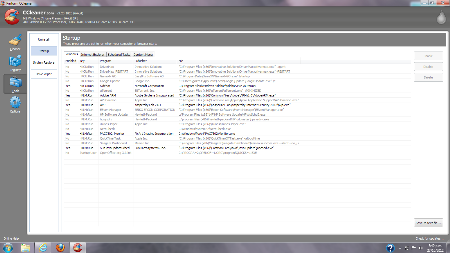 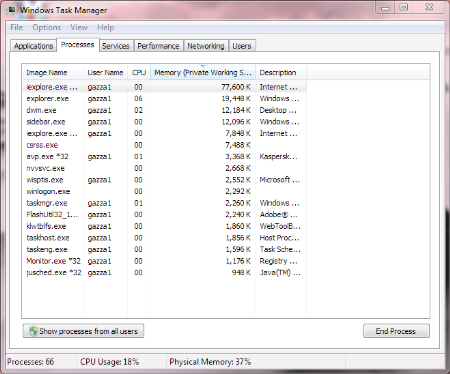 |
Posted By: like_to_strike
Date Posted: 27 Oct 2012 at 8:51pm
|
thanks for the help so far
edit: sits about 10% cpu usage and 1.4gb or ram on idle after startup
|
Posted By: krow
Date Posted: 29 Oct 2012 at 8:05am
If all else fails you could try this guy. Sorry I don't know anything about him, but this flyer is on our notice board at work.
 |
Posted By: SpidersWeb
Date Posted: 29 Oct 2012 at 4:27pm
|
Some things to try: - Firstly try double clicking a program, and just waiting. It could be just running as slow as hell and when you run the programs ten times by continually clicking you could be making it worse. My Mrs had a Compaq laptop with a lovely AMD CPU of that vintage, and it redefined painful on an updated Windows 7 with the latest browsers etc. Her machine with Chrome open sat at 18% CPU. - If it's a damaged OS then you could try System Restore in Control Panel, find the oldest backup point you can and try to restore. I had to use this last week to save my Mrs' brand new PC from a Windows Update that killed the network devices (grumble grumble) - or See if the machine has a recovery partition - lots of manufacturers put the recovery files on the actual hard disk. This restores the machine to how it came when it was new. - or if it's definately a bung OS and nothing has worked so far, I'd copy all his private data off and say "f**k it" - make or find a Home Premium 64bit OEM CD, format the drive, and reinstall fresh (you could try repair, it might work, but when machines get this bad I prefer to format and install fresh). Use the CD key which should be stuck to his machine somewhere. What I tell people is: If it's not a big open source project or you didn't buy it for money from a reputable company - do not install it - not even once.
|
Posted By: Jet_ski_fisher
Date Posted: 31 Oct 2012 at 1:03am
|
Ok what are the programs that take so long to open. ------------- http://www.legasea.co.nz" rel="nofollow">  MH... Catch measure release...<*))))< |
Posted By: Telecaster
Date Posted: 31 Oct 2012 at 8:25am
|
If it didn't come with any disks then there will be a recovery partition in there somewhere. The may be a "Create recovery media" shortcut in the start menu, which will walk you thru burning the recovery disk. It is a legal requirement for an OEM to include either a recovery partition or some installation media. I would just copy all his data off and re-image the machine once I had found/created the recovery media. |
Posted By: like_to_strike
Date Posted: 31 Oct 2012 at 9:56pm
|
telecaster. thats what im doing this weekend now haha given up. thanks to all you guys for helpings. its appreciated. Cheers
|