Laptop into a GPS
Printed From: The Fishing Website
Category: General Forums
Forum Name: Tech Topics
Forum Description: IT - Computers, software, phones, ISP's....
URL: https://www.fishing.net.nz/forum/forum_posts.asp?TID=31006
Printed Date: 23 Nov 2026 at 3:05am
Topic: Laptop into a GPS
Posted By: Lethal
Subject: Laptop into a GPS
Date Posted: 16 Jul 2008 at 11:41pm
|
just a thought for those that are keen to take there laptop out to sea......... on Trademe is a GPS receiver that plugs into your USB port very similar to mine.... check it out here....... PM me if your keen to do this i will help you out.... http://www.trademe.co.nz/Trade-Me-Motors/Boats-marine/Parts-accessories/Navigation-devices/auction-165325077.htm - http://www.trademe.co.nz/Trade-Me-Motors/Boats-marine/Parts-accessories/Navigation-devices/auction-165325077.htm |
Replies:
Posted By: Olfart
Date Posted: 22 Jul 2008 at 7:10pm
This is my little laptop/GPS ...
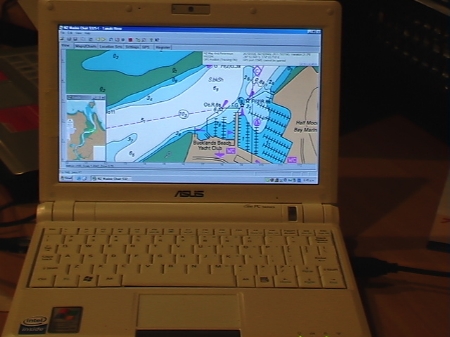 It is an Asus EeePC with a solid state hard drive and a 9 inch screen
 ------------- Semper in excreta sumus, solum profundum variat.... |
Posted By: CanadianJohn
Date Posted: 22 Jul 2008 at 7:22pm
| will be the cheaper way to go soon with laptops dropping price. |
Posted By: ThomasW
Date Posted: 22 Jul 2008 at 7:39pm
|
The cheapest model of the Asustek EeePC can now be gotten for under $400, plus $120 for the GPS Receiver. A few hundred for the appropriate software and the days of dedicated chart plotters in dry boat cabins could be numbered. Would a high end chart plotter offer any advantage over a Laptop/GPS combination? More waterproof and maybe better quality GPS unit... |
Posted By: Olfart
Date Posted: 22 Jul 2008 at 7:48pm
|
My software cost me $25.00 off Trademe (PolyMedia NZ Mapped Marine). Has all the charts I could ever want. and I can load all of the ones which came with the software -or just the ones to suit the areas I usually fish in.
Setup cost was just under $900 all up, which is a damn sight cheaper than a full blown colour plotter... and I still have the advantages of having very portable little laptop which I can use anywhere.
 ------------- Semper in excreta sumus, solum profundum variat.... |
Posted By: DIY!
Date Posted: 22 Jul 2008 at 7:50pm
| What is the software you are running on that nice little machine? |
Posted By: Olfart
Date Posted: 22 Jul 2008 at 7:56pm
|
Windows XP.
You need to be careful about this as some charting software won't run with Vista - I'm not sure about the Linux platform, so made sure my EeePC came preloaded with XP.
------------- Semper in excreta sumus, solum profundum variat.... |
Posted By: DIY!
Date Posted: 22 Jul 2008 at 8:03pm
| I can't find the charting software on trademe. Do you have any contact details? Do you have the name of the charting software? |
Posted By: Olfart
Date Posted: 22 Jul 2008 at 8:11pm
|
Hi Amanda
The software is NZ Mapped Marine marketed by http://www.polymedia.co.nz - www.polymedia.co.nz
PolyMEDIA Limited
PO Box 324, Nelson, 7040
Ph. 03 5478200
Cheers
------------- Semper in excreta sumus, solum profundum variat.... |
Posted By: DIY!
Date Posted: 22 Jul 2008 at 8:16pm
| Thanks guys I am keen to look at this as a charting solution - I have not found any EEE PC for under $400 though sounds like good deals you guys got. |
Posted By: Olfart
Date Posted: 22 Jul 2008 at 8:22pm
|
You might score a second hand one off Trademe, Amanda, for around that price, but they are generally the smaller screen (7" model) with less built in memory and a slowerprocessor.
Mine is the 900 model, with 16 gigs of on-board memory and I can add more via an SD card (up to another 16 gigs, I think.)
------------- Semper in excreta sumus, solum profundum variat.... |
Posted By: Jake76
Date Posted: 22 Jul 2008 at 8:29pm
| OF that looks good had a look at the max sea programe and thought about all the cool spots and trips I could plan.... productive use of work time i think. |
Posted By: DIY!
Date Posted: 22 Jul 2008 at 8:33pm
| Thanks Grant, I will keep a look out for one. That site does not "sell" as such but I will send him an email. This is an excellant solution for a chart plotter... for very reasonable costs. Thanks for your help. PS my b'day is a day after yours. |
Posted By: ThomasW
Date Posted: 22 Jul 2008 at 8:36pm
|
I got the price from http://pricespy.co.nz/cat_22.html - http://pricespy.co.nz/cat_22.html |
Posted By: Olfart
Date Posted: 22 Jul 2008 at 8:51pm
Go the Virgos....! Top folk....  ------------- Semper in excreta sumus, solum profundum variat.... |
 DIYchick! wrote:
Posted By: DIY!
Date Posted: 22 Jul 2008 at 9:01pm
I have checked out that link - but note the OS is Linux and not XP... just what grant said about the software being compatable.
Yeah go the Virgos!
|
Posted By: Dead Ant
Date Posted: 22 Jul 2008 at 9:01pm
|
I buy a lot of my gear from www.acquire.co.nz. I'm not associated with them but they have looked after me well as an online trader. Prices are usually good and you can speak to them on the phone. They used to stock Micronet USB GPS but don't seem to anymore? Those PC's look really good but for a couple of hundy more you can probably go a full screen Tosh. I do like the solid state hardrive though! Cheers DA Cheers |
Posted By: Olfart
Date Posted: 22 Jul 2008 at 9:17pm
|
I also have a 17" laptop but felt it was too good to use on the boat and would take up too much space. I loaded the software onto that pc (which has a Vista platform) and it works fine except that the help menus do not work (compatibility issue).
------------- Semper in excreta sumus, solum profundum variat.... |
Posted By: ThomasW
Date Posted: 22 Jul 2008 at 9:25pm
|
True, I forget that EeePC came standard with linux. Would be ideal if the software was compatible because linux is much smaller compared with windows. The windows version of the EeePC seem to start at $850. It is possible to get a full size Acer (with vista) for that |

Posted By: Olfart
Date Posted: 22 Jul 2008 at 9:51pm
|
Should apologise here to Lethal - I seem to have hijacked your thread, mate!
Militaris: I was worried about the size of the XP software, which is why I went for the EeePC 900. Also, I was fortunate that a young computer geek at work was able to tweek the system for me and strip out all of the unwanted bits of XP which take up so much space on the system drive.
I will not be using the laptop for word processing, so all that stuff has been removed. I have kept OutLook Express, Internet Explorer, Acrobat and AVG antivirus, plus I have loaded the chart software and GPS software.
Here is the result:
C:Drive (Local drive) : Standard capacity 4 gigs - still has 2.51 gigs free
Data drive (D) : Standard capacity 8 gigs - still has 7.35 gigs free
------------- Semper in excreta sumus, solum profundum variat.... |
Posted By: Ferg.
Date Posted: 22 Jul 2008 at 10:05pm
|
For those willing to try it, have a look at Seaclear (http://www.sping.com/seaclear/) Free GPS Navigation Software. Works really well. Interfaces with most GPS's. And you can download the maps for free from LINZ. Takes a bit of learning, but free is good. |
Posted By: Keith C
Date Posted: 22 Jul 2008 at 10:34pm
Eee PC - 389 + gst from a reputable dealer (if you dont mind white, which apparently is fashionable for the fishos from this site  ) http://pbtech.co.nz/index.php?item=NBKANB010 - http://pbtech.co.nz/index.php?item=NBKANB010
They also have the USB GPS for 99 + gst
For those outside Auckland, DSE has the EEE at around 470 including.
|
Posted By: ThomasW
Date Posted: 22 Jul 2008 at 11:04pm
|
Playtech has them for $429 (inc GST) and they are good to deal with. I am quite amazed how cheap the Eeepc have become.... Might have to buy myself one just to keep in the car. |
Posted By: krow
Date Posted: 23 Jul 2008 at 12:36pm
|
This looks great. Unfortunately especially as I've already got a laptop, I don't think It'll last long in my boat as spray, rain etc might be a problem. Remote screen an't the answer either as controls need to be at hand.
What's the screen like to view in sunshine? Not that we've had much of that lately. Are these more suitable to cabins? As soon as I disconnect the main power supply my screen goes dim and I assume the idiots that designed the thing thought this was a great thing as power use is less. |
Posted By: Lethal
Date Posted: 23 Jul 2008 at 2:24pm
|
it needs to be in a cab or set up under the dash outa the way of any chance of getting water on it....... other things that can be attached are a spy cam fitted into a underwater torch via a USB port as well, great for filming or just looking at underwater terrain.... here are some pics from my onboard cam.... top 2 are snap shots while it was being held over the fish while the wife feed them..... 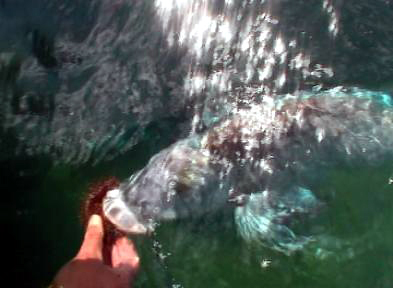 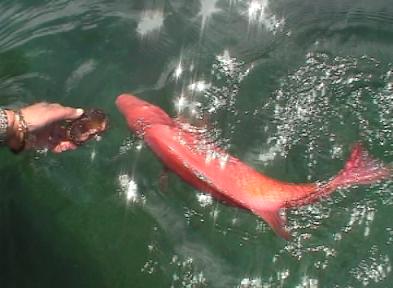 these 2 are snaps from the film after recording 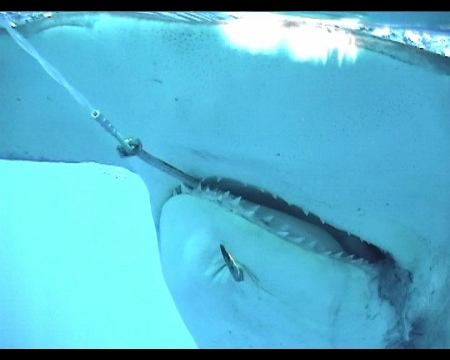  |
Posted By: Olfart
Date Posted: 23 Jul 2008 at 3:34pm
Eric (Lethal) has indicated that the laptops need (ideally) to be in a dry cabin situation in order to keep water off them and I agree with that. That said, my boat does not have an enclosed cabin but as a couple of our colleagues can attest, it is a very dry boat and I have never had water get up onto the dashboard, so I am willing to take the chance.... I guess it will be a case of exercising some prudence in inclement conditions
 Krow: These laptops are designed to be used outdoors and all the advertising blurbs show a sweet young thing lying on the beach doing the "computer thingie". The screens are anti reflect coated so glare should not be a problem - anyway the screen angle can be adjusted if glare does become an issue. I will be using a battery jump start unit as an external power supply in the meantime and will look into a more permanent solution via a ciggie lighter socket in due course. The proof is going to be in the testing - when I finally get a chance to get out, that is......!
------------- Semper in excreta sumus, solum profundum variat.... |
Posted By: Moocha
Date Posted: 23 Jul 2008 at 4:06pm
|
That is a bloody clever idea and very well priced, yes Sir I like it
Awesome stuff lethal
 |
Posted By: Olfart
Date Posted: 24 Jul 2008 at 4:53pm
|
Can't take any credit for the "clever idea", Moocha...!
Was really impressed with the set up Eric (Lethal) had on his boat when I went out with him back in May - the day of the BIG FOG. We left a heap of frustrated fishos waiting at the ramp and navigated our way out through the fog using his laptop GPS system. That got me thinking about a solution for my own boat and now that it is all ready to go, I just thought I would share the results with forum members...
Cheers
------------- Semper in excreta sumus, solum profundum variat.... |
Posted By: Dead Ant
Date Posted: 24 Jul 2008 at 8:37pm
|
I've also bought gear from PB Tech and found them helpful. They have physical stores which can be quite good and their prices and aftersale service is good. Solid state HDD will be a boon for marine use. The hammering of a hard drive has probably slowed them down for a long time. I'm planning a dedicated PC built into my new machine but am nowhere near ready to spec it yet. Cheers DA |
Posted By: Olfart
Date Posted: 24 Jul 2008 at 8:48pm
|
DA:
Check out how this guy in the States did his set up
http://www.sailthechannel.com/asus-eeepc-at-sea - http://www.sailthechannel.com/asus-eeepc-at-sea
------------- Semper in excreta sumus, solum profundum variat.... |
Posted By: floater
Date Posted: 24 Jul 2008 at 8:50pm
|
how long would it's battery last? would it chew much off the main circuit? is the usb gps thing an actual receiver so you wouldn't need to hook up the handheld gps to it? it looks like a good way to save some bucks. nice ------------- out of here |
Posted By: Olfart
Date Posted: 24 Jul 2008 at 9:02pm
|
Battery time is only about 2-3 hours. That is why I am going to use a power adaptor plugged into a battery jump start unit until I get around to wiring in a cigarette lighter socket on the boat. The jump start unit I have, already has a ciggie lighter socket on it, so it may end up as the final solution anyway...
I don't think there will be a huge draw-off of power, so the jump start unit should easily last a day's fishing.
The neat thing is, that if I get the chance to go out on someone else's boat I can easily take the little laptop with me as it only weighs 0.9kg...!
Edit:
The USB GPS antenna is a full blown receiver and the software defaults to your actual position on the water and automatically selects the most approriate chart. You can connect a hand-held GPS unit if you want to instead of using a USB antenna.
------------- Semper in excreta sumus, solum profundum variat.... |
Posted By: floater
Date Posted: 25 Jul 2008 at 9:55am
|
Cheers Grant, I been thinking about this a while, & been playing with seaclear at home but never knew about these 'outdoor' type laptops. will put this on the wishlist along with the rest of the crap i've convinced myself I NEED 8-) ------------- out of here |
Posted By: DIY!
Date Posted: 02 Sep 2008 at 9:04pm
| Hi guys what charting software should I get? Lethal and Oldfart are you guys using the same usb gps device? any suggestions on how to mount it on fibreglass? |
Posted By: Olfart
Date Posted: 02 Sep 2008 at 10:05pm
|
Hi Amanda Hope Lethal doesn't mind me replying for the both of us... He uses Nobeltec charting software - and he kindly gave me a copy, but I have had difficulty loading it so I went for the software I mentioned in my earlier posts. Earlier in this thread someone else mentioned a free charting software, so if you read back over the thread you will pick up on that one. You could also have a look at the e-frontier (NZ) website for further options and prices as regards the latest version of the Nobeltec range of software. As far as the usb antenna is concerned Lethal mentioned the following URL: http://www.trademe.co.nz/Trade-Me-Motors/Boats-marine/Parts-accessories/Navigation-devices/auction-165325077.htm - http://www.trademe.co.nz/Trade-Me-Motors/Boats-marine/Parts-accessories/Navigation-devices/auction-1653250 (I think the seller was e-frontier). I purchased mine from them via Trademe. The antenna is magnetic but you could put a bit of double-sided tape underneath it so it will adhere to fibreglass. Edit: Another - (and probably better) option would be to buy one of those non-skid mats which are sold for use in the boot of your car to stop things moving around. I'll be doing this on my boat to hold the laptop in place behind the windscreen and will be getting a piece big enough to accomodate the laptop and the gps antenna. Hope this helps! Cheers ------------- Semper in excreta sumus, solum profundum variat.... |
Posted By: kaveman
Date Posted: 03 Sep 2008 at 7:36am
|
Olfart. You can buy a GPS cable that plugs into the back of your laptop which has its own receiver on the other end. cost about $130 from memory. I have got Memory Map software package, very easy to use and only cost 3-400 to setup including second hand laptop. Cheers Kevin -------------  www.kavemantackle.co.nz |
Posted By: Olfart
Date Posted: 03 Sep 2008 at 3:25pm
|
Thanks for that, Kaveman That's the type of antenna I have for my setup - cost me $119 plus GST from E-frontier. Cheers Grant ------------- Semper in excreta sumus, solum profundum variat.... |
Posted By: kens
Date Posted: 03 Sep 2008 at 3:56pm
Ive got Seaclear but I cant figure out how to get the maps of LINZ, any chance of some advice? ------------- The past, the present and the future walked into a bar. It was tense. |
Posted By: Dohboy
Date Posted: 03 Sep 2008 at 5:22pm
| What type of laptop is required to run the software ? ie ram and processor |
Posted By: Olfart
Date Posted: 03 Sep 2008 at 6:17pm
|
Dohboy - my EeePC 900 laptop is running a stripped down version of Windows XP home edition. These are the details of available space after the strip-out of unnecessary parts of Windows and loading the NZ Mapped software plus IE, Outlook Express, AVG Antivirus, wireless internet capability and Spy Doctor: C:Drive (Local drive) : Standard capacity 4 gigs - still has 2.51 gigs free
Data drive (D) : Standard capacity 8 gigs - still has 7.35 gigs free I can add more data capacity through an additional plug-in SD card (up to 16 gigs if necessary). The processor is pretty tiny as you would expect in a small pc but it handles things fine, so any normal sized PC would not have a problem. I only went for the EeePC because of the solid state hard drive system. I think Apple Macs have the same system?... but cost was a factor at the time... Edit: Check out how this guy in the States did his set up
http://www.sailthechannel.com/asus-eeepc-at-sea - http://www.sailthechannel.com/asus-eeepc-at-sea
------------- Semper in excreta sumus, solum profundum variat.... |
Posted By: Domdomingo
Date Posted: 03 Sep 2008 at 6:48pm
|
Hey Kens, I've been playing around with SeaClear for awhile now. To get the maps into SeaClear from LINZ you need to use the included MapClear program to change the format of the LINZ TIFF files. Basically you need to 'calibrate' them. Try having a good read off the included Help file. Load the TIFF file into MapClear then set map parameters, and set two calibration points. Save. Update. Sorted. |
Posted By: kens
Date Posted: 04 Sep 2008 at 12:57pm
Thanks man, I had a play around last night finally read the instructions. Looks like the go to me, now I just got to find the cheap laptop.------------- The past, the present and the future walked into a bar. It was tense. |
Posted By: 41south
Date Posted: 04 Sep 2008 at 1:03pm
I run SeaClear II with the imported NZ maps from LINZ. Great value for the money  
|
Posted By: kens
Date Posted: 04 Sep 2008 at 3:57pm
|
Ok so I had a look at the little eeepc at dick smith, linux, $398. The problem is to get xp to use the Seaclear on it. Any clever low cost ideas? ------------- The past, the present and the future walked into a bar. It was tense. |
Posted By: 41south
Date Posted: 04 Sep 2008 at 4:15pm
| You can either reload it with XP or run SeaClear on Linux using an emulator program such as 'Wine', which I have tried on a test PC and *appears* to work quite well. The only thing I am not sure about are the serial/usb interfaces to the gps under Linux. |
Posted By: Olfart
Date Posted: 04 Sep 2008 at 4:36pm
|
Kens - here is a link showing how to load XP onto an EeePc: http://www.atomicmpc.com.au/forums.asp?s=2&c=21&t=1979 Might be useful... Cheers ------------- Semper in excreta sumus, solum profundum variat.... |
Posted By: DIY!
Date Posted: 19 Sep 2008 at 7:34pm
|
Ok boys so here it is... I have finally got it all sorted - well I hope so i will be testing it tomorrow on the briney. How have you guys found the LCD brightness? I am not convinced about that yet even with brightness engaged to the max.
EEE PC purchased from DSE then spent a day removing linux and installing windows xp. I have now installed memory-maps and have configured the GPS.
I have instructions that were not quite perfect but have been able to improvise and get it sorted. I created a bootdisk on a camera SD card then blew away all the partitions (Hard drive that Linux was set up on) then used a copy command to transfe the XP setup files (I386 dir) via a 4 gig thumb drive... it took a little while to copy.
BTW make sure that the file write has been set to a minimum as solid state HDD have a limited life span! I am still in the process of completing this portion.
Cheeers DIY
|
Posted By: Haydan
Date Posted: 20 Sep 2008 at 5:23am
| Anyone ever seen or heard of a USB transducer? That'd be great to have a GPS/Fish finder Laptop. |
Posted By: 41south
Date Posted: 20 Sep 2008 at 2:01pm
I did find one a while back when researching the same idea - turned out to be a VERY expensive option 
|
Posted By: Spaz
Date Posted: 21 Sep 2008 at 12:38pm
|
I am, like a few of you guys, looking into this a an option to upgrade from my garmin 176c. The back lighting isn't that great on the garmin and with the small screen , it can be hard to tell where you are on the map, unless you zoom out, but then you loose the detail. Here is what i'm looking at..... The company I work for manufactures Industrial TOUCH SCREENS !!! as one of its product lines. After a bit more investigation into them, I noted that we do some of these touch screens with a built in PC. Most have a hard drive built in, but one product line uses a 1gb flash memory.. They run either a Celeron 1ghz in a 8.4" 800x600 resolution screen with 512mb ram to a pentium 1.6ghz 15" 1024x768 resolution screen. The two options i'm looking at are : 1 - Use the standalone touch screen as an interface to a laptop which are avalible in various sizes up to a whooping 19". 2 - use a Magelis Compac iPC as I out lined earlier. All the screen have a combination of serial or usb comm ports and some have ethernet. Some of these are pricey units, but compared to the cost of the larger screened GPS combo units could be a viable option. I am going to investigate further. |
Posted By: Spaz
Date Posted: 21 Sep 2008 at 12:44pm
|
Have a look at this link to see what I'm considering. http://ecatalog.telemecanique.com/dsmapp/data/pdf/EN/TL4/43632-EN.pdf |
Posted By: kens
Date Posted: 23 Sep 2008 at 2:40pm
I just saw this on the net
http://homepages.ihug.co.nz/~bvdb/pcff80.html - http://homepages.ihug.co.nz/~bvdb/pcff80.html
Dont know the price, has anyone tried it? ------------- The past, the present and the future walked into a bar. It was tense. |
Posted By: DIY!
Date Posted: 25 Sep 2008 at 7:28pm
|
Testing is now complete on my EEE PC running XP with the stock standard build. I have added no extra ram or anything. I have chosen the Memory Map software that came bundled with a USB GPS reciever.
I found the tracking abilities of the GPS and softare to be spot on, I can seemlessly zoom in and out of maps that are both small scale into large scale, very cool for planning trips. I have also figured out how to create waypoint routes that can effectively measure distance which is great for fuel calulations! as my vessel does not have an inline fuel monitor (soon)
It is invaluable to have accurate track lines when drift fishing, i now target "fishy" spots via the drop offs and contour lines - so far I have got three limits of snapper on three occasions! Choice role on summer.
the down side is the brightness of the LCD even with the settings tweaked it still requires to be in the cabin and out of direct sunlight - I can get around this by installing an additional monitor but until I have a secondary house battery this will go to the wish list.
Another disappointment is the length of time the battery has... only around 3-4 hours, again I have purchased a car charger to help with this.
All in all a very cost effective solution, and I am very happy other than the two points just mentioned.
I will make myself available to those that require assistance with the same or similar setup.
Cheers DIY
|
Posted By: fishfishfish
Date Posted: 12 Nov 2008 at 5:23pm
|
hey everyone
just stumbled upon this thread and there seem to be a few knowledgeable people contributing. i have been planning a setup like this with a laptop also connected to another lcd screen. what im wanting to know is would there be any way to have gps software running and on the laptop screen while at the same time have a movie or maybe fishfinder? running on the same laptop yet being shown on the other screen? or am i dreaming? i would plan to use the laptop for both navigational and entertainment purposes and it would be great to have both usable once for those long trips! or maybe i need 2
 i would be running the laptop through a car charger on straight 12v. the other screen however would run off a cheap square sine inverter. does anyone know if just lcd screens by themselves have any problems running off square sine? cheers |
Posted By: KeriBOI
Date Posted: 12 Nov 2008 at 7:11pm
|
Hey fishfish, youd want a pretty good spec'd lappy, but it should be pretty easy to run a second monitor. Its all in the graphics card settings. If the card is a Nvida use "Configured independently from each other (dual view)" setting No idea how to work a Ati card, but im sure its as easy. ------------- Before you judge a man, walk a mile in his shoes; after that, who cares?! He's a mile away and you've got his shoes! |
Posted By: Boulder
Date Posted: 12 Nov 2008 at 7:23pm
|
DIY there is a company in the states that builds pop out hoods to give your lappie screen the ability to be viewed in daylight on the cabin shelf Pm Obald for the link as he showed it to me to get one for mine ------------- http://www.boulderguiding.co.nz">  http://www.boulderguiding.co.nz">www.boulderguiding.co.nz |
Posted By: Dead Ant
Date Posted: 12 Nov 2008 at 9:26pm
|
fff - should be no problem as Keriboi says. There should be a utility piece of software to configure the output of the monitor plug. Basically you want an extended desktop rather than a duplicated one. Most graphics cards can do this. Then drag the DVD window across to the big monitor. Hope this makes sense The company Boulder is talking about is Hoodman USA. The ones you want are at http://www.hoodmanusa.com/products.asp?dept=1019 - http://www.hoodmanusa.com/products.asp?dept=1019 Good luck with it all. Cheers DA |
Posted By: Softbaiter
Date Posted: 13 Nov 2008 at 9:57am
| I was all set out to do this a little while ago with my Ls800 tablet pc, but i got burlged and it got stolen, Now someones already done it, It will make it a ton easier. Cheers |
Posted By: paulylovesfishing
Date Posted: 13 Nov 2008 at 12:24pm
|
Hi OLD fart thats an excellent idea using a Solid state drive in conjuction with your EEEPC being that it take forever for it to boot around 20-30 seconds on average also I was under the impression that eepcs didnt take harddrives but rather removible media ------------- "support the kahawai petition" |
Posted By: paulylovesfishing
Date Posted: 13 Nov 2008 at 12:26pm
|
Mate running two screens at same time would be easy az if you need help txt me Super Cheap PC Repairs 0212300174 ------------- "support the kahawai petition" |
Posted By: paulylovesfishing
Date Posted: 13 Nov 2008 at 12:33pm
USB 2.0 SVGA Adapter
would make life easyier aswell
becuase most laptops have a dvi and a vga ------------- "support the kahawai petition" |
Posted By: Softbaiter
Date Posted: 13 Nov 2008 at 2:33pm
|
two screens would be a bit of overkill really, just get a slightly bigger laptop with a decent sized screen. Or a tablet The Hp 2133 is a step up from the eeepc - 120gig Hard drive and 2gb of ram http://villageidiotsavant.blogspot.com/2008/04/hp-eeepc-killer.html |
Posted By: DIY!
Date Posted: 13 Nov 2008 at 2:41pm
|
Hi Guys - I have crashed my solid state hard drive several times, I was only crossing wakes but it still crashed. I was very suprised by this and would have expected this from a standard drive that spins and is read by the "read, write" head.
Also it is important to remeber that solid state is only designed for a "short" life span so this solution may be effective for only a year or two especailly when running a windows based OS such as XP. i would recommend a panasonic toughbook though - they are costly though perhaps sourcing an older model via ebay would be worth while.
Cheers DIY
|
Posted By: Olfart
Date Posted: 13 Nov 2008 at 4:15pm
|
My Eee PC 900 has an inbuilt solid state "drive" and can also take a removable SD card - up to 16 gigs I think. I just read DIYChick!'s post about crashing the drive on her Eee PC, so figure if I have similar issues, I'll transfer the mapping software to an SD card and see if that makes a difference. Hoping to do the first test of the unit this weekend (at long last!). At the moment I am attempting to construct a temporary "hood" to shield the screen from direct sunlight as my boat does not have an enclosed cockpit and am expecting problems (as per one of DIY's earlier posts). The longer term plan is to hook up an external monitor (if I can find a small one that runs off twelve volts or similar) and then I can store the laptop in the cabin where it won't get knocked around. I was wondering about using a digital photo frame or something similar if I can find one that doesn't need to run off mains power. Any suggestions, anyone?
------------- Semper in excreta sumus, solum profundum variat.... |
Posted By: kens
Date Posted: 13 Nov 2008 at 4:22pm
|
I am thinking around the same thing, I'm sure there are some pretty hardy screens available that are used in industrial situations. ------------- The past, the present and the future walked into a bar. It was tense. |
Posted By: DIY!
Date Posted: 13 Nov 2008 at 4:59pm
|
I will take some photos shortly of the "stand' I have had made, my laptop now sits on a think sponge to absorb some shock and is tidied down with a large rubber band - which seems to have made a difference, the sun is still an issue though.
I think that you will need an inverter some where to make an additional monitor work.
Cheers DIY
|
Posted By: Carbine
Date Posted: 13 Nov 2008 at 5:03pm
|
What about the 5 or 7" screens they boy racers put in head rests and stuff? ------------- 
|
Posted By: DIY!
Date Posted: 13 Nov 2008 at 5:19pm
| I know that mad sounds had a monitor that went into trucks... i am thinking that this had an inbuilt inverter... not sure on the pricing though |
Posted By: Softbaiter
Date Posted: 14 Nov 2008 at 12:27pm
|
most of the boy racer monitors are S-Video input, if your laptop has s-video out then you are in luck, Otherwise you will need a VGA - S-Video converter http://www.dse.co.nz/dse.shop/491cb6d3041792302740c0a87f3b06bc/Product/View/XH8624 Luckilly these ones dont require an external power source, just usb and once you have rigged this up you can run a normal TV with RCA av inputs, although the picture wont be as sharp as svga or dvi, it will still work |
Posted By: tas-tackle
Date Posted: 15 Nov 2008 at 6:38pm
|
DIY Chick... I used a Panosonic Toughbook 8" for quite some time when I had the Bigger boat... I used a PCMCIA GPS unit with an extended aerial ( still have this if any one is interested) ... Power for the laptop was generated from a ciggy lighter through a power adapter to raise the volatge to 19 volts.. With the Laptop battery ( acts as a filter) in the laptop, it allowed the motor to be started with out sending a huge pulse to the laptop from the outboard.. I made a custom base/bracket to hold the laptop in place and it worked extremeley well using nobeltec and maps for the software... Having gone down to a 15.6 boat, these days use a handheld 3.5in which still allows me to find my local spots using memory maps... ------------- http://postimage.org/" rel="nofollow">  http://www.tas-tackle.co.nz |
Posted By: tas-tackle
Date Posted: 15 Nov 2008 at 6:42pm
|
The Panosonic Tough Books stand up to some severe punishment... bounced banged about.. they were used in Iraq by Journo's because of their durability... If you can find one...they make a great cheap version for GPS navigation with large screen...
------------- http://postimage.org/" rel="nofollow"> http://www.tas-tackle.co.nz |
Posted By: DIY!
Date Posted: 15 Nov 2008 at 7:12pm
| Yeah exacttly fisher toughbooks are very cool, and can run over it with a truck and it is still gauranteed to work- I think these eee PC will last around 1 season, I personally would not go down this alley again. |
Posted By: Busted!
Date Posted: 15 Nov 2008 at 8:59pm
|
Dunno about the toughbooks as a long-term option, they have had reliability issues in the mining and construction industry with the internals getting cooked. They don't seem to be very powerful because of the internal heat thing and they don't seem to be able to take that much memory. They may have got a lot better in the last two years, I haven't been near one for that long. Oh, and the batteries die young too...
I looked at a brand new one a few weeks back but the battery life was only two hours brand new, made me think twice as it is nice to be able to keep the chartplotter running at anchor for swing and drag monitoring, and for the longer drifts - I think it could be a bit hard on the boats' battery reserves???
The eeepc with a whopping great SD card sounds like a possible solution, I think it could be expected that there will be some shock issues with wakes with any system - but on the face of it the solid-state might be the way to go just on cost alone...
|
Posted By: Olfart
Date Posted: 15 Nov 2008 at 9:14pm
|
Yeah, I think you are probably right, Evan. The EeePC is pretty robust for it's size. If you have a boat with an enclosed cockpit (like a hard top for example) then the EeePC seems to be the way to go. However, for those boaties who have cabin runabouts there is an issue with strong day light affecting visibility of the screen. If that issue can be resolved using a remote sunlight-viewable monitor then the EeePC could be a useful option for all. I think the jury is still out on that score... and a bit more research is required. ------------- Semper in excreta sumus, solum profundum variat.... |
Posted By: tas-tackle
Date Posted: 15 Nov 2008 at 10:43pm
|
Busted.... I ran an older model toughbook and used the boats power supply.. (dual battery setup) It ran win98se so wasn't resource hungry and I emptied all apps apart from nobeltec and the maps... Had it for over 2 years on the boat and it got thumped , banged, splashed and generally treated with contemp.. any normal laptop would have been hard done by the treatment and secumbed in quick time.. At the time it was a VERY cheap option for me ( in the computer trade) and did the job well... Previously used std cheap laptops didn't last a season... ------------- http://postimage.org/" rel="nofollow"> http://www.tas-tackle.co.nz |
Posted By: Busted!
Date Posted: 16 Nov 2008 at 5:43pm
|
They might have gotten better, but the ones we had did not really live up to the promise. Main issues were battery lifespan and discharge time, both very short and the hard drives and other bits died young.
The harddrive was the weak link, and the other hardware issues were due (I think) to the running temp of the units. The cooling was an issue...
We could get two cheap normal lappies and mount them into a frame/bracket in the vehicles for the price of one toughbook.
I will say the concept was great, so if they've ironed the bugs out they could be the way to go for a chartplotter.
I'm tossing up between a tablet PC and the eeepc, the tablet gives you a bigger (touch) screen and with the OSK on screen keyboard ap you can run the thing under a clear plastic cover and leave it flat on the dash. Makes it a damn sight easier to shade when it's flat and not opened up at, and with the touch screen keypad there's no need to open it up to get to the hard keyboard at all.
A second hand tablet goes for roughly the same as a brand new eeepc and has a much bigger screen size...
After the first experience with the toughbooks, they do take the rough treatment better (for a time) but as with anything the better you treat it the longer it lasts.
|
Posted By: tas-tackle
Date Posted: 16 Nov 2008 at 6:06pm
|
I'm not gonna argue the point but can only speak from experience... I changed the original hard drive (only for more space)and as I said used the DUAL BOATS POWER SUPPLY to alleviate any battery time issues.. It worked well for me as per my last post and would recommend using them for a basic GPS / chart unit ... One could spend the megga bucks as per trademe for a tablet if wanted.. I used cheap lappies and they died a quick death simply from the sea salty air.. Its about horses for courses and the fickle eeepc IMHO wont last long when exposed on a jetski to the salty sea conditions or in an open boat unless protected extremely well... You have to then look at relative costs versus purchasing a proprierty GPS unit...
------------- http://postimage.org/" rel="nofollow"> http://www.tas-tackle.co.nz |
Posted By: DIY!
Date Posted: 16 Nov 2008 at 6:14pm
| I agree completely with *fisher* in the past we fitted an HP tablet to the habourmasters vessle - and even though it had touch screen etc it was still less that satisfactory in strong light. The best GPS IMHO is a dedicated unit, power is not really an issue as you have the ciggy travel adapter. |
Posted By: Busted!
Date Posted: 16 Nov 2008 at 9:54pm
|
Would have to agree with the dedicated GPS unit, although having used several the chartplotters tend to lag behind the PC in terms of speed of use and user interface. It's hard to beat a wireless trackball/point and click PC chartplotter on the helm in that regard...
Most of my experience has been with a full PC running off either an inverter or the genset, with a TFT flatscreen flat in the helm station next to the radar. As long as it's shaded properly the light glare isn't too much of an issue, dimming the thing down enough for night work is. Some LCD screens simply will not adjust down far enough for night work, something to be considered for those taking longer trips! I have a piece of brown fabric mesh, of all things. No, it's not a stocking!
From what I have seen so far, the Seaclear software isn't quite as easy to pick up as the Nobeltec or C-map (it's not far behind though) but it seems up with the others for clarity and speed of use. The Polymedia product didn't fly at all, to many glitches with the chart alignment and calibration (2Nm errors between charts are a no go on any system). I have a copy of NZ mapped marine if anyone wants it - going real cheap!
Where I'm looking at now is either the little eeepc or the tablet with the Seaclear program. Just gotta see where I can get the best deal - then we are in business.
This thread has been really useful, I hadn't seen the Seaclear software until I read it. I was looking at Nobeltec based on cost compared to C-map, but the Nobeltec system I was using didn't thrill me overly. I think the Seaclear setup could be really useful though!
|
Posted By: Olfart
Date Posted: 16 Nov 2008 at 10:23pm
|
If you decide on the EeePC.. I could possibly do you a deal on mine. I had it out on the boat on Saturday but decided too many issues with strong daylight on my open cockpit boat for it to be a goer for me. So have decided (reluctantly) to keep my eye out for a dedicated GPS unit. Mine is the EeePC 900 and has a stripped down version of Windows XP on it. (XP NLite) It comes with a new GPS antenna, and power adaptor for a ciggy plug, plus a mains charger and carry satchell. Wireless internet is still available, as is IE and Outlook Express. If you read back over this thread there is a link to show how to set up the EeePC for linking to an external monitor for in-cabin use. Pm me if you are interested... ------------- Semper in excreta sumus, solum profundum variat.... |
Posted By: Softbaiter
Date Posted: 09 Feb 2009 at 7:54am
|
little bit offf topic, but related I have converted by GPS equipt Blackberry to a plotter! Very easy once you do the searching and find the right programs Compatible phones here - http://wiki.trekbuddy.net/index.php/Devices The actual Nav software is called Trekbuddy. it has no maps though. You will need Mapcalibrator to calibrate your charts then TBcutter to output the map and the calibration file into the correct format, you then simply copy that to your BB and open the map in trekbuddy and whala! |
Posted By: Kenzo
Date Posted: 09 Feb 2009 at 1:52pm
| I can help transforming any laptop into a GPS chartplotter and fishfinder but you have to be aware that a normal hard drive wont survive while driving a boat. Shock is too strong fora normal hard drive. Solid state is good but it's pretty expensive and quite unreliable - has a limited life span. |
Posted By: Softbaiter
Date Posted: 09 Feb 2009 at 5:52pm
|
will any of the applications run on linux? Could do it via usb stick with damn small linux or another live cd |
Posted By: Kenzo
Date Posted: 09 Feb 2009 at 7:43pm
| I can only do Windows appz, not Linux |
Posted By: naomi
Date Posted: 16 Mar 2009 at 11:49am
|
I am in the early stages of setting a laptop up as a Chart Plotter and have the Quick Chart programme.
Can you advise where to purchase a Holux GPS receiver
Any advice you can offer would be appreciated
I know a Solid State hard drive is required
|
Posted By: Catchelot
Date Posted: 27 Apr 2009 at 9:22pm
G'day Eric, out of interest could you tell me about how much you paid for this USB GPS unit, that plus the whole of this thread is incredible! With all of this technology who needs to pay through the ars# for a dedicated and proprietary Marine GPS/Chartplotter? Well done Sir!  ------------- "The sea, once it casts its spell, holds one in its net of wonder forever." - Jacques Cousteau |
Posted By: Lethal
Date Posted: 08 May 2009 at 7:20pm
|
i payed $150 for the Gps/USB recevier from Disk Smith Electronics....
ive seen them cheeper on TradeMe since i brought mine but im very happy with it....
|
Posted By: Olfart
Date Posted: 08 May 2009 at 10:48pm
|
The guy selling the USB GPS aerials on trademe is (I think) a chap who doesall sorts of chartplotters and marine electronics out at Te Atatatu. Try googling for: http://www.efrontier.co.nz/estore/product_info.php?products_id=113 I just looked and he has them in stock for $100 plus gst ------------- Semper in excreta sumus, solum profundum variat.... |
Posted By: Jet_ski_fisher
Date Posted: 08 May 2009 at 11:12pm
| Umm why not just pm me for a copy of bluechat 9 and then hook up a usb gps for a laptop and then have all the charts up todate and free. saves a lota money and hassles :) just a thought |
Posted By: DIY!
Date Posted: 08 May 2009 at 11:21pm
| It is worth noting that it is important to watch the battery voltage if you leave the GPS left on when drifting, and make sure the laptop is pre-charged else it could suck your starting battery dry. I have had a fairly close call. I think I will install a trickle charge. Anyone else had similar issues? DIY |
Posted By: Moggy
Date Posted: 09 May 2009 at 11:18am
|
Has anyone experience with the software as per link below? Not cheap but then I have learnt you get what you pay for... Look forward to comments. http://www.memory-map.co.nz/products/marine/marine_linz.htm - I am using a Compac tablet - not fast but almost indestructible, been bounced round the world with me many a time and has the added advantage of being able to draw on the screen. Not sure if this software can handle that form of marking?
------------- People who say it cannot be done should not interrupt those who are doing it! FISH FIGHT The Peoples Protest |
Posted By: Catchelot
Date Posted: 09 May 2009 at 10:08pm
Good point, it would pay to check the power consumption of your laptop, the older ones draw more of course, and then maybe think about a separate battery like a good sized 12V Gell Cell, that is completely independant and seperate to your starting battery, that must be kept sacred and reserved for starting and basic lights and emergencies. What size is your boat, what size engine and its alternator size if you know and how much gear runs off your starting battery? ------------- "The sea, once it casts its spell, holds one in its net of wonder forever." - Jacques Cousteau |
Posted By: Catchelot
Date Posted: 09 May 2009 at 10:10pm
Thank you for your kind offer and assistance, I shall do so Sir. ------------- "The sea, once it casts its spell, holds one in its net of wonder forever." - Jacques Cousteau |
Posted By: Catchelot
Date Posted: 09 May 2009 at 10:35pm
|
Thanks Lethal and OF,
My bro'n'law buys second laptops and spare bits and dishes them up and onsells them, some of these would make great non-expensive GPS Plotters and has the capability of much more... Are there any good sounding/sonar equipment that can interface to a laptop for display purposes, USB or Ethernet Network Ports, etc...with out costing the earth. And then well, we can start talking about Engine, Fuel and Monitoring Management software and so on... Cell Phone, Smart/PDA phones interfaced to the laptops and then Internet and email, so extra communications on our boats... In summary, just a few services and examples a laptop could run and monitor on a small boat, the bigger the boat and the more sophisticated then more jobs that computers could do; GPS - Direction/Position/Charts/Navigation/Steerage/Autopilot/Compass Sonar - Depth/Fish location/Bottom/Terrain/Topology/Temperature/Salinty/PH Machinery - Fuel, Engine, Water, Power, Voltage, Current, Batteries Comms - Internet/Google-Earth, G-Maps/Email/Skype/IM/Weather Fax/Metservice/Coastguard/SMS/Text/Cell Camera - Underwater Cameras DVD - Recorders and Players Data Logging Entertainment - Movies/Music Photo - Editting/Storage Scheduler/Ships Log/Documents.... And much more... ------------- "The sea, once it casts its spell, holds one in its net of wonder forever." - Jacques Cousteau |
Posted By: Catchelot
Date Posted: 09 May 2009 at 11:00pm
|
SOP, I tried to PM you twice, access denied for some reason.
So any info you wish to pass on; [email protected] Thanks mate Al ------------- "The sea, once it casts its spell, holds one in its net of wonder forever." - Jacques Cousteau |
Posted By: Jet_ski_fisher
Date Posted: 10 May 2009 at 12:10am
| sweet as sending mail now :) |
Posted By: tas-tackle
Date Posted: 10 May 2009 at 12:21am
|
Moggy.. I downloaded and tried a lot of the various GPS navigational software and couldn't go past Nobeltec... If you think memory map is expensive you wouldn't have liked the price of Nobeltec... For many years I have used laptops as a "BIG SCREEN" gps unit and having sold my larger boat, now use a handheld GPS/PDA unit which has Memory Map on it... not as comprehensive as Nobeltec but excellent all the same with the added bonus that for 20 bucks you can add SPOTX to it with all the relative data... the toughbook Lappies are excellent for boat use as they have suspended hard drives and are actually tested by being "dropped"... Used by Journo's in IRAQ because they standup to the hard knocks... MEMORY MAP is VERY cheap for what you get... Check out the Boat show..They usually have a stand there and have a discounted show special price... Backup is incredible and they will help in any way... (My PDA/GPS is for sale on trademe) ------------- http://postimage.org/" rel="nofollow"> http://www.tas-tackle.co.nz |
Posted By: Jet_ski_fisher
Date Posted: 10 May 2009 at 12:35am
|
fisher thats impressive software if do say so my self :)
i downloaded a copy from http://www.torrentz.com/232fc0338bd0220c1f5e4d169890853c3fd5fb72 - http://www.torrentz.com/232fc0338bd0220c1f5e4d169890853c3fd5fb72
and yes its good stuff indeed
|
Posted By: Catchelot
Date Posted: 10 May 2009 at 9:38am
|
Hey Fisher,
(My PDA/GPS is for sale on trademe) Can you provide the trademe link and what is the discounted price for Forum members?  ------------- "The sea, once it casts its spell, holds one in its net of wonder forever." - Jacques Cousteau |
Posted By: tas-tackle
Date Posted: 10 May 2009 at 11:28am
|
Just search "empus" Its a 3.5in unit so good size rather than the 2+ inch Santa.. I think Americas Cup Boats used it in the last defence... Tried a few other downloads but still come back to Nobeltec.. Memory Map is also very very good IMHO... ------------- http://postimage.org/" rel="nofollow"> http://www.tas-tackle.co.nz |