iPad + Navionics as a chart plotter???
Printed From: The Fishing Website
Category: General Forums
Forum Name: The Boat Shed
Forum Description: Discuss all things boating.
URL: https://www.fishing.net.nz/forum/forum_posts.asp?TID=127985
Printed Date: 11 Jun 2026 at 7:37pm
Topic: iPad + Navionics as a chart plotter???
Posted By: bricker
Subject: iPad + Navionics as a chart plotter???
Date Posted: 15 May 2018 at 6:05pm
|
At the risk of asking the obvious, would an iPad loaded with the Navionics app. work as a navigational aid/chart plotter? Work have very kindly provided me with a flash iPad and waterproof cover!!! It just strikes me that with the Navionics app installed, I might have a large screen, high definition plotter at a bargain price. Or am I barking up a completely different tree? Thoughts appreciated...before I shell out for a plotter that is of lower spec. than the one the boss has so thoughtfully provided :)
|
Replies:
Posted By: Don18025
Date Posted: 15 May 2018 at 7:57pm
|
We used exactly that plus an Iphone loaded with Navionics whilst navigating the canals of Europe last year. Worked extremely well. But it was for different navigation challenges.
|
Posted By: Kevin.S
Date Posted: 15 May 2018 at 8:33pm
| Ipad screens can be difficult to see in the sun, and if you are wearing polarised sunglasses you can't see them at all. The GPS reading on ipads, phones, etc is sometimes not all that great, but you can buy better gps units that link via bluetooth to them if you want better accuracy. Visibility was what stopped me using mine. |
Posted By: fushandchips
Date Posted: 16 May 2018 at 9:48am
|
I use my S8+ for exactly that and it works a treat. Its not highly accurate but with that and your finder you can quickly work out where you want to be. Just note that it eats the battery so I fitted a USB charge port to use while underway. |
Posted By: Steps
Date Posted: 16 May 2018 at 2:12pm
|
I have had a old adroid 4 (current is 9 or 10 now) Huawai 8" tab for the last few yrs. Make sure any tab you get has GPS sensors.. not just cell phone location. there is not good cell phone, if any towers to locate you at sea. I use a usb connection to matian full charge all the time at sea. It a is in a solid mount next to the lowrance(sounder) and the old huminbird with general gps.. (sounder disabled) A good solid mount is hard to find.. they usually require the thin pads that hold the unit in place replaced with thicker self adhesive sponge door/ window sealer. I have sealed in the vacuum packer in the past.. now just use good fitting a ziplock bag if may chop up or rain. The usb charge cable is taped up with quality insulation tape. At the ramp hit the "start" mid bottom of navionics screen and finish/ save when back at the ramp In the settings you can edit to add fish tides, amount fuel distance historical records. If logged in to navioncs , all these tracks any routes made and markers laid can automatically uploaded and down loaded on other devices if logged in. With GPS , even on old versions of andriod and tabs, accuracy at sea is consistently within 3 to 10 meters .. usually 3 to 5m max Down side, and will notice if doing a slow turn, it takes a few seconds to update position and direction.. caution doing so on a very dark night with nothing to take a bearing off... you can easy head in the wrong direction, look back at the screen , and opps. Navionics its self uses very little battery charge.. it is the navionics continuously requesting gps position from the sensor and its the sensor uses the battery. I have rooted (hacked) the tab to close off all bloatware, and other functions not required.. again quite dramatic increase in battery life..and faster gps positioning. Also navionics loaded on my 5" hauwai smart phone. I also have a program "life 360" running on my smart phone. I turn this on and the gps in settings before leaving home. My wife can then track where we are, where we have been.. get email and txt notifications when we leave and arrive at the ramp. If anything goes wrong she has very accurate positions, direction of travel for any emergency services. If she is at work.. and taken the camaro.. I take 'her' truck to tow the boat.. ppl at her work know Im fishing...its routine now they ask where we are.. and comes up on google maps on her phone. It just strikes me that with the Navionics app installed, I might have a large screen, high definition plotter at a bargain price. So hell yeah.. and a lot more than just a gps position and 2nd yrs subscription gets even cheaper @ 1/2 price approx $10. |
Posted By: letsgetem
Date Posted: 16 May 2018 at 5:42pm
|
My son has a tablet and Navionics as a chart plotter, on a 10m launch. It works very well. Does all the things my chartplotter does, and with touch, far easier than buttons. Its under a hard top and gets no direct sun on it. I assume that the screen wont be viewable in sun. Why aren't phones and tablets screens viewable in sun - like marine chartplotters and sonars are?? The mount needs to be very strong to withstand the shocks of boating. Smaller the boat, the worse the pounding - I do not think I would contemplate a tablet in my 4.6m Stabi. I assume any sea water getting on it would probably kill it. Even rain would possibly kill it?
|
Posted By: FizFisho
Date Posted: 16 May 2018 at 6:17pm
|
Why are you considering doing this? You will miss all the features of a combo chartplotter. Navionics on a small boat is overkill, really its good for areas of open ocean you dont know well. Most boats using it will have a Sonar to alarm them of other vessels/objects in close vacinity. A handheld GPS for waypoints in a small boat is useful, in a big boat a combo 9" system is the way to go. Too many negatives like battery and potential ip68 issues and accuracy for my liking. Can you do it? Yep. But I can also hit my head with a mallet which makes as much sense.
|
Posted By: Steps
Date Posted: 16 May 2018 at 7:52pm
|
Why are you considering doing this? You will miss all the features of a combo chartplotter. I dont have deep pockets.. And yes the "features" Put it like this.. my old classic daily driver doesnt have electric windows...I dont need a morden "feature " to wind then up and down And Vintage sold not long ago doesnt have a wind up "feather " like a winder or electric Yet they all have windows that do the job... go up and down. Navionics on a small boat is overkill, really its good for areas of open ocean you dont know well. Hell no..something like 200 or 500mm contour lines reefs / shore rocks etc...thats where can put our little 5.5m and even more so a ski or kayak. Too many negatives like battery and potential ip68 issues and accuracy for my liking. Really? you may gather from my post above .. and posts on other stuff, just the little things I throw in.. I cant know about unless i have actually done them.. include the bits that just say " dont do x " because in some cases have..and rather note actually say so Not everyone be it a kayak or big boat can afford a full gps/ sounder... Yep here I go again.. yep as I mentioned above I have on my 5" old smartphone..and yes have used it.. just as well as the tablet or as well as if on a 7" screen.. I have have glasses on for the smaller screens. Can you do it? Yep. But I can also hit my head with a mallet which makes as much sense.  The mount needs to be very strong to withstand the shocks of boating. Sorta .. advord ball change angle ones and no stickers...good clamp mounted ones As I mention change the pads.. once get a good one its keeping the tab in the holder.. We have come off the top of a few nasty chop waves hard once in a while.. in the last few yrs. It drops out of the holder on the carpet floor.. a crew goes to pick it up.. the skipper says , leave it dont let go.. just give it a kick down into the cabin floor. And it still goes.. I do not think I would contemplate a tablet in my 4.6m Stabi. I assume any sea water getting on it would probably kill it. Even rain would possibly kill it? It has been on charge in a plastic zip bag with the usb wire sealed up with good tape...I have had a wave.. no several over a good 20 mins, come over the bow up the screen , hit the gap between the bimini and screen, wet the3 hell out of us , totally soak the whole dash area... You have a el cheapo obsolete android tablet $150/ 200 bucks, about $20 for 12 months navionics..with maps, same identical as the detailed marine gps updated almost daly just for the hauraki gulf area alone .. and if travel / cruise around the 38/ mph on flat water notice a little delay in your position.. that catches up when slow down a little. A few months ago cant rem who.. doesnt matter.. was heading or in thru a mangrove channel and fog came down..ran aground and had a very interesting day... Even if had the same detailed maps on expensive big gps units.. on his 5" screen mobile phone...  It works far better than what I grew up on.. compass and maps.. Now THAT is a slow position up dare by the time you physically take bearings.  |
Posted By: FizFisho
Date Posted: 16 May 2018 at 8:30pm
|
Each to their own. Id be putting $500 plus maps into one of the new 9" Axiom Systems, which have great UX design between all modes. Boats arent cheap, the gear that comes with them isnt either, thats why id not scrimp on a 20+ft boat with an Ipad. And if navigating by navionics in the dark a person is asking for trouble. Thats what Sonar is for. So you dont run some people over, or worse get run over by a container ship. Im not saying they cant be used on an Ipad, I just personally will leave that up to other people as I dont see the point and would rather use other systems.
|
Posted By: whippersnappyr
Date Posted: 16 May 2018 at 10:13pm
| I use an iPad as a backup which has been very useful when my simrad was playing up. Also very good for passage planning. As others have said you need the 3G model as only they have GPS. The Pro models have very good bright screens. |
Posted By: Sufishent
Date Posted: 17 May 2018 at 6:58am
Utter nonsense. Navionics is essential for contour lines and underwater reefs. Have a handheld GPS and was a pita sitting in front of a chart, calculating where a mark was and then entering into the handheld. ------------- You can never have enough fishing tackle |
 FizFisho wrote:
Posted By: Don18025
Date Posted: 17 May 2018 at 11:32am
|
Fiz, if you are going to navigate anywhere really accurate charts are the way to go. You can never have anything better than an accurate chart.An up to date paper chart is the best, with corrections marked, but no one likes handling them. Navionics charts are great, not the out and out best, but they do a really good job. I note that my Navman GPS plotter is 14 years old, that means it has old charts as well. I have noticed in the past 10 years a lot of large pleasure boats are using computer systems on their boat for navigation and engine monitoring. They install a PC, large touch screens on the dash all connected to the Sounder, Radar, GPS and any other sensor they elect to use - example night vision sensors. Yacht racing has been using laptop and tablet based systems for navigation, measuring and monitoring for at least 20 years. I have always believed that having separate units are safer than having them all in one system. A few years ago, my son and I was travelling back to Auckland from Fitzroy at about 10 pm and 20 miles from A Bouy we had one of the boat circuits crash lost all lights, Sounder, GPS and Autopilot. Fortunately the other circuit was okay and we had the VHF and Radar to enable a safe entry without lights. So my Furuno Sounder, Radar, Navman GPS and Raymarine Autopilot are all separate units and will remain so in the future. You have made two wrong statements twice - "Most boats using it will have a Sonar to alarm them of other vessels/objects in close vacinity." "And if navigating by navionics in the dark a person is asking for trouble. Thats what Sonar is for. So you dont run some people over, or worse get run over by a container ship." Sonar will never prevent a collision with a container ship or a 12' tinny out fishing in the dark.. Sonar measures only what is under the boat. Radar identifies what is around your boat. Only AIS and Radar can prevent that happening but you need to be monitoring the radar screen and keeping watch. Note Radar showed up Astrolabe Reef to the crew of the Rena, but they were not monitoring the screen - crash. AIS is not installed on many pleasure boats so is not appropriate in this discussion. I do a lot of cruising at night and it is very safe, so long as all boats are correctly lit. And I still carry a sextant, learnt how to use one in 1978 and I still enjoy the magic of deriving a position line from the sun or stars. |
Posted By: FizFisho
Date Posted: 17 May 2018 at 4:28pm
|
Im not saying Navionics dont have their place, sorry I should have explained further, i was just in a rush and what i said didnt make much sense. What Im saying is by themselves they are pretty much just a map. And yes I meant radar, I had sonar on my mind with fish HUD. Also the really key importance with using them for waypointing is Sat accuracy, which the raymarine product and the galaxy tough pad, are designed for. scientists need to know the GPS is extremely accurate for various reasons like surveying the same species again in a years time. Raymarine and others now offer you full integration into navigating BELOW the water with various things like being able to chart both sides of the boat (dragonfly or other tech), but more impressively give you a 3d image of what that pinnacle you noted on your navionics looks like. And of course what fish are around it, with increasing accuracy. I work in Software User Experience design and Raymarine have done an outstanding job of integrating things, its like an Apple product, designed for the old and young, idiot proof. If you are going to use a tablet, go for the Galaxy Tab Ativ 2 just released. My mrs is a double doctorate in biology and they threw her one, so ive been using it for watching Netflix while she doesnt use it between surveying our worlds animals. They are damned tough and no need for a bag. They will take not just a beating, but a dunking at that with IP68 etc, also they are designed to be used by scientists with gloves or wet fingers, although I prefer the stylus. The stylus works the same as on Galaxy Notes etc. The screen to my surprised only being an 800x100 LCD screen looks like an AMOLED which they put in their S8 and Galaxy Tab S3. Was well impressed. More importantly is its GPS accuracy which is whats more important to you guys. Sure in a pinch an IPAD with a fish finder works, but so does me sitting in Tiri channel drifting waiting for a bite. Couple of quick videos. I really think from a user experience, Raymarine have done an outstanding job with this Axiom user interface. Keep in mind its plug and play, ie you can add things like radar, sonar obviously, 3d transducer to give you that real accurate 3d map under the water, and on it goes. Personally I think the 7" is too small, but usable in a small boat, 9" is the best, 12 is big. The software is so well integrated from Navionics to fish finder to 3d mapping. Thats where Navionics is useful, when its not standalone, imo. https://www.youtube.com/watch?v=5fI5KTBysZA" rel="nofollow - https://www.youtube.com/watch?v=5fI5KTBysZA https://www.youtube.com/watch?v=YVC7FmiGZiA" rel="nofollow - https://www.youtube.com/watch?v=YVC7FmiGZiA https://www.youtube.com/watch?v=MacMLG9V4Pk" rel="nofollow - https://www.youtube.com/watch?v=MacMLG9V4Pk |
Posted By: bricker
Date Posted: 17 May 2018 at 9:42pm
|
Hmmm......it's clearly a topic that polarizes opinions!! My reasoning for the inquiry was simple. I have been given an expensive top-of-the-range iPad with all the bells and whistles so thought for the cost of a Navionics subscription, I could put together a great little plotter/GPS system. Yes I do have a sounder/fish finder so all catered for in that department. Sadly, I don't have bottomless pockets so $500 plus maps into one of the new 9" Axiom Systems is way out of my reach with a young family, etc.!! My fishing is done in shore (i.e. in sight of land!!) and in daylight, so I'm not looking for something flash, just simply a way of finding fishing marks via coordinates, marking spots for future, etc. Appreciate everyone's thoughts and feedback.......gives me some direction :)
|
Posted By: DIY
Date Posted: 17 May 2018 at 10:41pm
|
Yep, I use an iPad mini with Navionics. I don’t have GPS on the iPad so bought a Garmin GPS receiver which bluetooths to the iPad. Works a treat and it’s the tablet I use for work etc. ------------- Oh what a smasher - two eggs and a rasher! |
Posted By: yknot
Date Posted: 18 May 2018 at 5:30am
|
Go for it, your finances, your boat. I use my tablet as a back up unit. Only caution saving spots may become public to other users. Have a look at spots saved on charts already. And be aware of limitations, can also get other third party GPS tracking programmes like locus pro for tracking and saving points. ------------- Those that say it can't be done are being overtaken by those doing it. |
Posted By: Steps
Date Posted: 18 May 2018 at 9:44am
|
If you are going to use a tablet, go for the Galaxy Tab Ativ 2 just released. Fisho Sry going to be blunt here m8 one moment you knock navionics on a tab.. next moment recommending a particular tab.. ansd expensive one to take to sea in a smaller boat Bottom line you, by your own admission from several posts.. not just on this subject but others on boat performance etc.. NOT from ANY personal experience, but comments from mr google searches which many of those are very likely based on your own comments. Also of note you have had comments deleted in the past..a particular make of boat..for just this sort of reason. Bottom line.. you have not a clue on the accuracy, or use of navionics on a tab or even a cell phone and therefore have nil to add to the original request of real experience in the original post.. Bricker.. load the navionic.. from memory you have a well or month or something free use. once loaded run the update...and run day before heading out.. so I'm not looking for something flash, just simply a way of finding fishing marks via coordinates, marking spots for future, etc. Sry to disappoint you.. you will get something far flasher than you ever expect.. contores tides.. detailed.. weather , NOAA general.. and around those reef, zoom in and you can see the guts, put the boat in them withing a few meters of accuracy.. TYhios is a reen swhoot off my 5" old smart phone note the contureline.. the numbers.. couple of my markers.. a community shared fishing marker. the rock details.. also the blue/ light blue white.. you can set all those depths to suit your boat, fishing depths etc.. not sure if pic will post.. check out the navionic web site herer.. the web site can log in but cant do many functions like tracks , markers .. http://webapp.navionics.com/?ticket=ST-1493511625rNKBQNGYg0-pXbHduqG#boating@13&key=~nn_Fqchl%60%40" rel="nofollow - http://webapp.navionics.com/?ticket=ST-1493511625rNKBQNGYg0-pXbHduqG#boating@13&key=~nn_Fqchl%60%40" rel="nofollow - http://webapp.navionics.com/?ticket=ST-1493511625rNKBQNGYg0-pXbHduqG#boating@13&key=~nn_Fqchl%60%40 Note the distance bottom right cnr... I can drop on repeated trips within the distance of the bottom tip of the blue marker.. IF position wait 30 secs to check.. on my phone or tab.. a marine gps unit is almost instant. 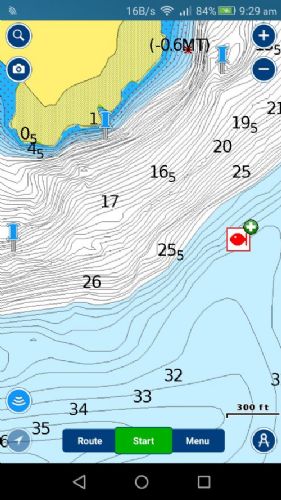 |
Posted By: FizFisho
Date Posted: 18 May 2018 at 7:11pm
I have no idea what you are being blunt about based on what you wrote, so Ill keep this short as your tone is not on. Actually I do have some idea about GPS accuracy and the differing of it between devices. And that combined with the tough books been made for out door use, in which I have used maps on them is why i recommended it for this type of application I cant be bothered trying to reply to put downs. Actually I didnt base anything I said on google. There is a reason Garmin etc are world leaders in GPS systems not iPads. An iPad is a dumbed down (thats a computing term so no offense) device (as are most tablets) for people who dont need to know how to use technology. They are not devices designed for GPS work. Will they work, sure. So please do not reply to me again in any thread. OP if this is an Ipad Pro thats $1200+ of your works hardware you are risking. Its your call. If its the base 9.7 its $500. Will it work, It will display Navionics yes. Accuracy is something I cant be bothered going any further into. |
Posted By: FizFisho
Date Posted: 18 May 2018 at 7:22pm
Spot on. As long as you are aware of the limitations and cost and you can live it then go for it. And be especially aware of the durability of the device you are using, especially if this actually an iPad Pro.
|
Posted By: Toyz
Date Posted: 18 May 2018 at 10:29pm
|
Simple answer yes it'll work great for basic navigation (e.g. great for helping find pins and contour lines) if your tablet is GPS equipped. For mounting and charging in the boat get yourself a Railblaza starport with a USB charger and the Railblaza tablet holder to keep things tidy.
|
Posted By: bricker
Date Posted: 19 May 2018 at 7:43am
|
Thanks guys.....as always sound advice from all quarters and yes, those of us that ask the question DO appreciate it when someone throws out a controversial comment or two.I love the passion we all have for our chosen sport/hobby/luxury/necessity!!!!!!!! I'm off to the boat show tomorrow (thanks Sezza!!) so will no doubt gather a plethora of info. and have some great conversations around the subject. Will probably give it a go as other fishos seem to have had success.
|
Posted By: Steps
Date Posted: 19 May 2018 at 10:50am
|
Only caution saving spots may become public to other users. Have a look at spots saved on charts already. Yep. turn off in settings.. cant rem what default is.. I cant be bothered trying to reply to put downs. Now you show me where I have put down , or personally attacked you. I have pointed out, several times that it is very obvious that you are consistently making comments / recommendations , not based on personal use.. in this thread and others and making them sound as your own experience. And example is tabs not suitable of boat .. well you tell that to my old huawei obsolete android 4...that has dropped hard out of the holder on the floor been kicked down into the cabin , slide around there, on many occasions.. and to all the tabs childen bash around in their school bags.. Also my professional experience in computers and into tabs etc goes back over 25yrs.. just retired from the industry. I have asked you on what basis that you base your opinions... You will see from my often criticized length of posts...I generally back up my stuff with how where and why... So Im asking again upon what personal experience are you making each your statements.... NOT what is in marketing brochures. Accuracy is something I cant be bothered going any further into. Hmm why? doesnt actual on the water r4eal life stuff, repeated many times over many yrs not match up with the very wide manufacturer specs.... wide so they dont get bad publicity in media when expectations acure ( excepts from personal experience covered in my previous post. So please do not reply to me again in any thread. You post up stuff about how to power boats.. rem? you must found cruches forumla.. then stopped, must discovered the std constanse dont work on modern trailer boats?? and dont know why?? Pile in comments as if personal experience on different boat types.. Comment on certain make of boat "that are prone to weld splitting".. (mods deleted those without even a complain from the rep on the forums here..)all based one instance that happened to be a very badly abused, not serviced, rig. So please do not reply to me again in any thread. People ask questions here..generally read the marketing brochures etc.. want actual personal experience information. not a re hash of marketing propaganda that omits product fault and limitations or just your perception.. worded in a manner to be hands on personal experience.. You do so, and espec if WRONG I will pull you up on it (or mods may delete in extreme cases) when it starts getting to the extent of pointing people in the wrong direction... mis information. I have made a few clangers here..even been banned a couple times...When I have been corrected, I realise , my mistake let it go. usually with a note of appreciation of the correction... and added knowledge. If believe still correct I will state my case, hows and whys into the debate.. Having to resort to " put downs" that no actual personal attack or put down has been made " please dont reply" ( interpets let me state my incorrect opinions as personal experience as fact. and not debatable) Hmm sry the rest of my statement could or would be directed personally..dont know how to put it politely. PS mate has a elcheapo on special obsolete tab on his jet ski with navionics.. got his lowrance on special.. new model coming out.. like mine just had the basic Cmap..and could not afford the navionics map to go with it.. Same as the full platinum version detail without the added pics and sounder to gps markers etc Found that out last night over dinner.. you do know the app version is the same as the top of the line platinum version in detail..with almost daily updates.. even in NZ waters/ harbours / coast.. without the fancy addon pics right? Well u might after my screen shot off my phone and link above... Anyway Im sure Bricker has the info he needs from all those who have put up their personal experience.. |
Posted By: Stonefish
Date Posted: 19 May 2018 at 11:45am
|
I think its a great idea, I often run my ipad with navionics next to my Raymarine MFD, basically lets me run three different screens when gamefishing etc - generally run sounder and radar in bird mode on the MFD and have navionics on the ipad. I also use the ipad to view SST maps from OceanSST so I can see where the good water is. ------------- 6.7m Surtees PureFisher - "Kraken" |
Posted By: bricker
Date Posted: 19 May 2018 at 6:10pm
| Thanks Stonefish.......another tick in the yes box!! |
Posted By: FizFisho
Date Posted: 22 May 2018 at 8:46am
|
Bricker I was thinking about this some more to help out. The Mrs brought home her tough pad gimbal last night. Anyone fishing in a boat they cant mount the Ipad this might be good. They basically sit flat against you and when in use they are facing up, so you can use your stylus, well use it full stop. Thats what the guys scaling our mountains would be using with the tough pad. Interestingly tough pads dont use glass like iPads. Its plastic from what I can make out, it feels weird under the stylus. Like a really thick non glossy computer screen. Also they come in a tough shell. So there is like 3 layers. Im going to ask a mate if there is any way to IP68 an iPad. lastly do you have a stylus and is yours the latest 9.7" normal iPad that now accepts the use of a stylus? Because one thing that helps with real accuracy is a pen/stylus. You may not be able to control your iPads GPS (not that it would be out by more than a few metres) but you can control where you put your way point :-). lastly if you cant mount it, as steps is doing, id try a cellphone/tablet waterproof bag, perhaps see if you can try it out in store. you can use a phone in one so i dont see why not an ipad. not sure about the stylus technology with Apple though. just a few ideas to chew on that might help or might not.
|
Posted By: Steps
Date Posted: 22 May 2018 at 10:15am
|
Because one thing that helps with real accuracy is a pen/stylus. You may not be able to control your iPads GPS (not that it would be out by more than a few metres) but you can control where you put your way point :-). you havnt actually used navionics right.. to be able to zoom in and touch...those markers get dropped damn near spot on... And in real world...you will be dropping on say a gut in a reef type of thing.. then either drifting over or anchoring and float lines back to it...either way u will be using area around and will see the gut you are targeting.. distance drift will change as to tide/ current wind. moot point. And if travelling, its easy enough to drag the screen (even thu moves centers as you travel, ok to zoom in small chop, but anything more.. skipper 2 hands on the wheel..watch the sea not play with picking up / using a stylus.. and try and drop onto the screen accurate... really? As to glass what ever...doesnt matter, just use basic common sense... eg a kid will kick a ball against a wall, but not a glass sliding door right.. same principle...one doesnt bash a sounder /gp screen either
|
Posted By: FizFisho
Date Posted: 22 May 2018 at 12:10pm
|
Steps the stylus means you dont need to zoom, just makes it one step easier, it also makes using the maps easier, in fact using the iPad. Think of it like trying to use a computer without a mouse. Yes ive used it on Navionics and the Mrs topography Biology maps. Its super easy. They only released that model recently though (although the expensive 10.5 and 12.9" Pro models have had it forever since release). Add to that 4g and a logitech keyboard and you have yourself a computer on the boat with a mouse acting as a stylus in which you can look up information regarding say a certain reef etc, then it just pulls off the keyboard and you put it back in its bag or on the dock and its back to being a stylus. Hence the term 2n1 computers these days. You guys have actually convinced me to buy one for my next small boat lol. RE glass, its not about bashing it, its about dropping it, thats why i suggested the tough pads as you can drop em and nothing happens, you drop and ipad and its potentially gone (it depends on what angle, what height, what you hit, but they arent that hard to crack). Lets say you are ultra hectic and you pick it up with a slightly slippery hand, dropped, yes it happens and no not just clumsy people. I repair them for people and it can happen for all kinds of reasons. Anyway, just putting a touch case on one will dramatically decrease the chances of cracking a screen if you are not mounting one. Steps Im just offering some advice on a subject Im familiar with, not trying to step on your toes here.
|
Posted By: Steps
Date Posted: 22 May 2018 at 1:40pm
|
Steps Im just offering some advice on a subject Im familiar with, not trying to step on your toes here. not steping on my toes.. Im just passing on 4 or 5 yrs of personal hands on use and experiance, trial and error.. yes errors failures to ..as to what and how things work and what doesnt.. Not 'therorcal' stuff as what should and should not work... Just an elcheapo, 8" .. 7 " is ok, old obsolete tab, on special is all thats needed... as I said mine is a old hauwai adroid ver 4 And mine has been thrown out of the holder to the floor far more times than can count.. then bounced on the floor in big chop, and kicked down into the cabin floor so not stood on, and bounced on that floor till get back to ramp not even a plastic protector cover, often not even the zip lock bag. |
Posted By: FizFisho
Date Posted: 22 May 2018 at 1:47pm
|
definitely, in fact id say that preferable way to go. the lenovos make a $250 8 inch tablet. havnt used one or tried maps on it, but cant see why it wouldnt work. |
Posted By: Steps
Date Posted: 22 May 2018 at 2:52pm
|
Hmm lenovos. dont know about the later ones but the ealier ones did not have gps location... had wirleless location. Again as I said previously , when looking for a tab , check the settings/ location and has the gps location setting... sometimes it maybe greyed out. if so make sure can turn on... Dont ask the guy selling , 9 times out of 10 they dont know the difference between the 2. Thu can be 'fun' when ask for their manager and point out that the poor guy on the floor hasn't been trained in the details of the products... generally they dont know the difference either
|
Posted By: whippersnappyr
Date Posted: 22 May 2018 at 6:11pm
| I don’t think an Apple Pencil would be of any benefit |
Posted By: Muzzfishing
Date Posted: 23 May 2018 at 7:46pm
|
I have got Navionics on my phone use it as a back up to the GPS, sounder as there is more on the Navionicss charts than on my Sounder plotter. Its a good back up. Turn on at the start of the trip and records every where I have been for the day. Gives time distance and speed for the trip, trips can also be recorded for the future. ------------- http://www.legasea.co.nz" rel="nofollow">  A Good Skipper Keeps the water on the outside of the boat. A Good Skipper Keeps the water on the outside of the boat.
|