Web site
Printed From: The Fishing Website
Category: General Forums
Forum Name: Forum comments and feedback
Forum Description: Anything related to posting or running of the forum, check here
URL: https://www.fishing.net.nz/forum/forum_posts.asp?TID=116890
Printed Date: 03 Feb 2026 at 7:28pm
Topic: Web site
Posted By: Otto
Subject: Web site
Date Posted: 01 Apr 2016 at 9:48am
|
Are others having problems reading the site. Since last night it seems to be all over the place, both on windows IE and the iPAd. |
Replies:
Posted By: SaltyC
Date Posted: 01 Apr 2016 at 10:09am
| Fine on Chrome, but it seems we have a new brighter palatte that is taking a little getting used to, currently wearing sunglasses to view! |
Posted By: Otto
Date Posted: 01 Apr 2016 at 10:15am
here's my view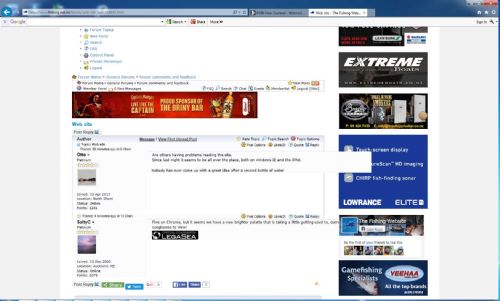 |
Posted By: sink
Date Posted: 01 Apr 2016 at 10:17am
| Same as you otto. |
Posted By: SaltyC
Date Posted: 01 Apr 2016 at 10:36am
| I do have add blocking turned on so don't get any of that Cpt Morgan or side bar stuff |
Posted By: SaltyC
Date Posted: 01 Apr 2016 at 10:46am
Hmm, something else is going wrong as i can't see photos that have been posted recently i9n some threads, I get the following if I try to open the image (I can see the video):Detailed Error Information:
|
Posted By: CanadianJohn
Date Posted: 01 Apr 2016 at 11:58am
| i am having trouble posting, third try. |
Posted By: CanadianJohn
Date Posted: 01 Apr 2016 at 11:58am
| ahh, thats better! though i'd been blocked!! |
Posted By: Ginge
Date Posted: 01 Apr 2016 at 12:40pm
|
Hi All There have been a number of changes implemented over the last 10 days - including a new responsive forum theme, security enhancements, a new caching engine, a CDN, adding the ability to upload from iDevices and numerous other underlying changes. We're busy ironing out all of the gremlins as we speak - so please bear with us. If you experience problems here are some things to try; - if the page looks funny - press CTRL + F5. This will force a reload of the style files that we've been updated. (try it a few times if necessary) - if you have a problem with logging in either delete all cookies from fishing.net.nz and try again or contact me via email - [email protected] - If you spot anything else that's not quite right post it here or upload a screenshot etc and we'll take a look at it. Also let me know your OS / Browser combination. eg iPad / Chrome, Windows / Edge etc We've tried to test it across as many devices and platforms and browsers as possible - but small things always crop up. Thanks Craig ------------- The Fishing Website - Fishing.net.nz Fishing knowledge on-line... |
Posted By: Otto
Date Posted: 01 Apr 2016 at 12:44pm
|
Cheers Craig that ctrl + F5 bit seems to have things looking better here. Running IE11 on this machine
|
Posted By: Ginge
Date Posted: 01 Apr 2016 at 12:51pm
|
CanadianJohn - you would have been having issues whilst I was updating the image folders. That should be all good again now. SaltyC - do you still get the same issue? I can see that image. ------------- The Fishing Website - Fishing.net.nz Fishing knowledge on-line... |
Posted By: Southern_Jez
Date Posted: 01 Apr 2016 at 1:13pm
| having issues in chrome, appears fine in IE11 ... |
Posted By: CanadianJohn
Date Posted: 01 Apr 2016 at 1:17pm
|
Posted By: CanadianJohn
Date Posted: 01 Apr 2016 at 1:18pm
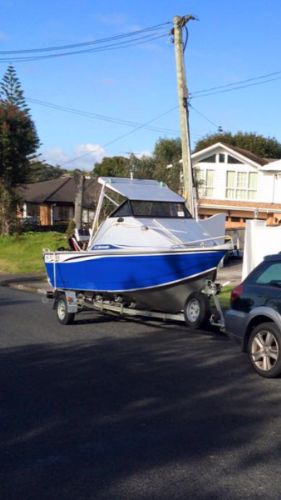
| holy ****a! its been a loooong time since i uput a photo up cause the iphone issues. i can write fishing reports again. hallelujah! |
Posted By: CanadianJohn
Date Posted: 01 Apr 2016 at 1:19pm
| that took about 20 seconds start to finish. brilliant. |
Posted By: Bounty Hunter
Date Posted: 01 Apr 2016 at 1:53pm
|
ctrl+f5 worked a treat for me - on chrome ------------- No disintegrations! |
Posted By: SaltyC
Date Posted: 01 Apr 2016 at 2:15pm
|
Ginge, Yes problem is still there for those .jpg files. I can see the .png file posted above by CJ I get the same error on the latest photo in the Catch of the Day thread (only went there for test purposes of course hmmpppfff) but I can see the earlier postings. Running Win7 Pro 64, chrome 49.0.2623.110m
|
Posted By: SaltyC
Date Posted: 01 Apr 2016 at 2:36pm
|
tried in both IE and firefox and both worked fine. Now working in Chrome after I cleared all browser data for today.
|
Posted By: Otto
Date Posted: 01 Apr 2016 at 2:54pm
| footers/signatures seem to appear as part of the message now |
Posted By: paw
Date Posted: 01 Apr 2016 at 3:18pm
|
I can only read the last posting on any subject---the rest of the posts only show the top half of the first line-like this SaltyC  http://www.fishing.net.nz/forum/member_profile.asp?PF=48153" rel="nofollow - - http://www.fishing.net.nz/forum/search_form.asp?USR=SaltyC" rel="nofollow - - Platinum   Joined: 10 Dec 2003 Location: Auckland, NZ Status: Online Points: 2083 tried in both IE and firefox and both worked fine. Now working in Chrome after I cleared all browser data for today. http://www.legasea.co.nz/" rel="nofollow">  http://www.fishing.net.nz/forum/web-site_topic116890.html#top" rel="nofollow">   Post Options Post Options http://www.fishing.net.nz/forum/new_reply_form.asp?TID=116890&PN=1&TR=19" rel="nofollow - - http://www.fishing.net.nz/forum/report_post.asp?PID=1629700&FID=39&TID=116890&PN=1" rel="nofollow -  Likes(0) Likes(0)  http://www.fishing.net.nz/forum/new_reply_form.asp?Quote=1&PID=1629700&PN=1&TR=19" rel="nofollow - Quote http://www.fishing.net.nz/forum/new_reply_form.asp?Quote=1&PID=1629700&PN=1&TR=19" rel="nofollow - Quote  http://www.fishing.net.nz/forum/new_reply_form.asp?PID=1629700&PN=1&TR=19" rel="nofollow - Reply http://www.fishing.net.nz/forum/forum_posts.asp?TID=116890&PID=1629700&title=web-site#1629700" rel="nofollow"> http://www.fishing.net.nz/forum/new_reply_form.asp?PID=1629700&PN=1&TR=19" rel="nofollow - Reply http://www.fishing.net.nz/forum/forum_posts.asp?TID=116890&PID=1629700&title=web-site#1629700" rel="nofollow"> Posted: Posted: ------------- sleeping is a symptom of caffeine deprivation |
Posted By: paw
Date Posted: 01 Apr 2016 at 3:19pm
|
No not like that ------------- sleeping is a symptom of caffeine deprivation |
Posted By: Cigar
Date Posted: 01 Apr 2016 at 6:37pm
|
New posts page look like crappie, all black and white and cramped. How do I ctrl f5 on a tablet? |
Posted By: Ginge
Date Posted: 01 Apr 2016 at 8:51pm
|
Cigar - bloody good point. Very difficultly! The quick fix on a tablet is to go to settings (sorry I am an iOS slut) for safari or Chrome then choose "clear history and website data". that will sort your local cache. Then close your browser (completely by swiping in iOS) and reopen it and load up the page. That should sort it. If not drag the page down a few times which will reload it. do that a few times and it will eventually get the new files. To help we're clearing the server cache each hour at the moment too. Cheers Craig ------------- The Fishing Website - Fishing.net.nz Fishing knowledge on-line... |
Posted By: Cigar
Date Posted: 02 Apr 2016 at 4:26pm
I'm android, but did find how to clear website data. Layout of new posts page was still same, but today refreshed the page and bingo - fixed! |
 Ginge wrote:
Posted By: Ginge
Date Posted: 02 Apr 2016 at 4:56pm
|
Excellent - yes, we've been working on things today. ------------- The Fishing Website - Fishing.net.nz Fishing knowledge on-line... |
Posted By: Otto
Date Posted: 06 Apr 2016 at 4:26pm
|
Oy you guys playing with the web site again and the fishing comp site done that ctrl F5 thing Seems my screens not big enough especially on the comp web site.
|